Cabinet Lock with Timer: The Complete Guide to Time-Based Cabinet Access (2026)
Master the cabinet lock with timer: scheduled access, daily weekly holiday programs, timed auto-lock, installation, battery, audit trails, and pricing.
What Is a Cabinet Lock with Timer? Definition and Core Concepts
A cabinet lock with timer is an electronic or electro-mechanical locking device that restricts access to a cabinet based on clock time rather than static credential possession alone. A cabinet lock with timer embeds a real-time clock, usually a DS3231 module with ±2 ppm accuracy, plus a microcontroller that compares the current time against programmed schedules and unlocks only when the moment falls inside an approved window. Unlike a plain keypad lock, a cabinet lock with timer can enforce daily, weekly, holiday, and one-time access windows, support timed auto-lock with 1-99 hour countdowns, and log every open and denied attempt with a timestamped audit record. Typical cabinet lock with timer deployments include office supply rooms, school charging carts, laboratory chemical cabinets, and rental lockers, with battery life spanning 12-24 months on four AA cells. A certified cabinet lock with timer carries CE, FCC, and RoHS approvals and should be selected on timing accuracy, schedule capacity, and credential redundancy.
Definition and Core Concept of a Cabinet Lock with Timer
A cabinet lock with timer is defined by the union of two control dimensions that ordinary cabinet locks keep separate: who may open the cabinet and when. In a conventional keyed or keypad lock, possession of the correct credential is sufficient at any hour of the day. In a cabinet lock with timer, the credential is necessary but not sufficient, because the lock additionally requires that the present moment falls inside a time window that the administrator has pre-authorized for that credential. This transforms the cabinet from a container that is either always accessible or always sealed into one whose accessibility is a function of the schedule stored inside the cabinet lock with timer. The core concept is therefore conditional, time-gated access, evaluated locally at the door.
The access decision is made by the cabinet lock with timer itself, on the lock's own microcontroller and real-time clock, not by a remote server. Because the cabinet lock with timer evaluates schedules locally, the cabinet stays protected even when the network is down, the mobile app is unreachable, or the building loses internet connectivity. This local autonomy is a defining property of a cabinet lock with timer and is exactly what makes it suitable for cabinets that are mobile, remote, or operated in disconnected environments such as warehouses, field laboratories, and mobile pharmacy carts.
How a Cabinet Lock with Timer Differs From Ordinary Locks
A cabinet lock with timer differs from an ordinary lock in four measurable ways. First, an ordinary lock enforces possession, while a cabinet lock with timer enforces policy. Second, an ordinary lock cannot express a repeating calendar, while a cabinet lock with timer can hold dozens of daily, weekly, and holiday windows. Third, an ordinary lock leaves the cabinet unlocked until someone remembers to secure it again, while a cabinet lock with timer re-engages its bolt automatically when the countdown or schedule expires. Fourth, an ordinary lock produces no record, while a cabinet lock with timer timestamps every open, deny, tamper, and battery event. These four differences mean the cabinet lock with timer converts cabinet security from a manual duty into an automated guarantee, which is the fundamental reason organizations adopt time-based access control.
Core Components of a Cabinet Lock with Timer
Every cabinet lock with timer integrates six core hardware blocks: the microcontroller, the real-time clock, the actuation mechanism, the user interface, the power subsystem, and the logging memory. The real-time clock in a quality cabinet lock with timer is a temperature-compensated module such as the DS3231 with ±2 ppm accuracy, which loses less than one minute per year. The actuation side of a cabinet lock with timer is either a solenoid delivering 3-5 N of force with a 0.2 second response, or a motor bolt delivering 5-8 N with quieter operation. The user interface of a cabinet lock with timer is typically a keypad, an RFID reader, or a smartphone app connection. Power comes from four AA or AAA cells with 12-24 months of life, and logging memory stores 500-10,000 events depending on the cabinet lock with timer model.
Cabinet Lock with Timer Types and Classifications
A cabinet lock with timer is classified into mechanical, digital electronic, and smart networked categories by actuation method, timekeeping technology, and connectivity. Mechanically timed models use a wind-up or quartz clock mechanism and are the simplest type of cabinet lock with timer, while digital electronic variants use a microcontroller and a real-time clock chip and represent the most popular cabinet lock with timer category today. Within the electronic group, a cabinet lock with timer may be standalone, meaning it is programmed directly on its keypad, or networked, meaning schedules are pushed to it over Wi-Fi, Bluetooth, Zigbee, or RS-485. A mechanical cabinet lock with timer supports only a fixed countdown such as 5, 10, or 30 minutes, whereas a digital cabinet lock with timer supports custom daily and weekly schedules with down-to-the-minute precision. Smart cabinet lock with timer models add app programming, audit logs, and remote override. Commercial-grade cabinet lock with timer units operate at 4.5-6 V DC and meet CE, FCC, and RoHS requirements.
Mechanical Cabinet Lock with Timer Variants
A mechanical cabinet lock with timer is the simplest category, using a wind-up spring or a quartz movement to count down a fixed duration before releasing or re-securing the bolt. These models typically offer presets of 5, 10, 30, or 60 minutes and are common in kitchens, laundries, and children's safety cabinets. The main advantage of a mechanical cabinet lock with timer is low cost and total immunity to battery failure, but it cannot express daily or weekly schedules and provides no audit record.
Digital Electronic Cabinet Lock with Timer Variants
The digital electronic cabinet lock with timer is the most popular category today. It pairs a microcontroller with a real-time clock chip and a keypad, so administrators can program custom times for unlock and relock. A typical digital cabinet lock with timer stores 1-10 user codes and 1-20 schedules, runs on four AA batteries, and supports timed auto-lock with a 1-99 minute countdown. Programming is done directly on the keypad through a simple menu, which makes the digital cabinet lock with timer ideal for offices, schools, and homes.
Smart and Networked Cabinet Lock with Timer Options
A smart or networked cabinet lock with timer adds wireless connectivity, so schedules can be programmed from a phone app or web dashboard and pushed to many doors at once. Communication options include Bluetooth 5.2 for nearby programming, Wi-Fi 802.11 b/g/n for cloud dashboards, Zigbee 3.0 for mesh environments, and RS-485 or TCP/IP for wired enterprise networks. A networked cabinet lock with timer also uploads audit events, supports remote override, and can synchronize its clock to a network time source. These models carry the highest price but are the right choice when a cabinet lock with timer must be managed at scale.
Power and Form Factor Differences in a Cabinet Lock with Timer
Cabinet lock with timer products differ in power source and form factor. Most run on 4.5-6 V DC from three or four AA batteries, while hardwired cabinet lock with timer units accept 12 V DC or 24 V DC from a central supply and eliminate battery changes. Form factors include rim-mounted units that bolt to the door face, mortise units that recess into a 16 mm door edge, and cam-lock style cabinet lock with timer modules that replace existing cabinet cam locks. The right form factor depends on door thickness, cabinet construction, and whether the cabinet lock with timer must fit an existing cutout.
| Cabinet Lock with Timer Type | Timer Technology | Typical Price | Best Application |
|---|---|---|---|
| Mechanical countdown | Wind-up or quartz | $8-25 | Kitchens, laundry, child safety |
| Digital standalone | MCU + RTC keypad | $25-60 | Offices, schools, homes |
| Digital RFID | 13.56 MHz card + RTC | $40-80 | Hospitality, shared storage |
| Smart networked | RTC + Wi-Fi/BLE/Zigbee | $60-180 | Enterprise, multi-door |
| Hardwired electromagnetic | RTC + 12/24 V magnet | $80-200 | High-traffic, glass doors |
How a Cabinet Lock with Timer Works: Time-Based Access Control
A cabinet lock with timer is a time-gated locking device that works by comparing the current time, read from its real-time clock, against a set of programmed schedules held in non-volatile memory. When a user presents a credential, the cabinet lock with timer checks two conditions in sequence: is the credential valid, and is the present time inside an allowed window? If both conditions pass, the cabinet lock with timer energizes its solenoid or motor bolt for 0.2-0.5 seconds and grants access; if either fails, it records a denial with a timestamp and sounds an optional buzzer. In timed auto-lock mode, the cabinet lock with timer starts a countdown the moment the door is opened and re-engages the bolt automatically after 1 to 99 minutes, with the default typically 30 seconds to 5 minutes. In one-time window mode, the cabinet lock with timer accepts a temporary code or card that is valid only for a specific date and time range. A precision cabinet lock with timer loses less than 30 seconds per month thanks to its ±2 ppm temperature-compensated oscillator.
The Real-Time Clock Inside a Cabinet Lock with Timer
The heart of any cabinet lock with timer is its real-time clock, which maintains the current date and time even when the lock is powered down. High-quality cabinet lock with timer designs use a temperature-compensated crystal oscillator such as the DS3231, rated at ±2 ppm, which accumulates less than 30 seconds of error per month across an operating range of -10°C to +55°C. Because the clock never stops, the cabinet lock with timer knows the precise minute even after months in storage. This accuracy is what lets a cabinet lock with timer enforce a schedule that starts at 08:00 and ends at 17:00 with exacting repeatability.
Timed Auto-Lock and Countdown Timer Locks
A cabinet lock with timer in countdown mode behaves like a countdown timer lock: the administrator or user opens the cabinet, and the cabinet lock with timer starts a timer that automatically re-engages the bolt when it expires. Common settings range from 30 seconds to 99 minutes, and the countdown is usually shown on an LCD or LED display. This timed auto-lock feature of a cabinet lock with timer eliminates the classic failure mode in which a user opens a cabinet, walks away, and leaves it unlocked for hours. Many cabinet lock with timer units also offer a delay setting that keeps the door open just long enough for a person to retrieve an item.
One-Time Access Windows and Time-Gated Credentials
A more advanced cabinet lock with timer supports one-time access windows, in which a temporary code or RFID card is valid only during a specific date and time range, for example, Tuesday 14:00 to 16:00. After the window passes, the cabinet lock with timer invalidates the credential automatically, even if it was never used. This is invaluable for contractors, delivery staff, and short-term renters. A cabinet lock with timer can also be paired with time-gated credentials that combine a schedule with a credential list, so only a specific person can open during a specific shift.
Clock Accuracy and Drift Compensation in a Cabinet Lock with Timer
Clock drift is the enemy of time-based access control. A low-cost crystal in a poor cabinet lock with timer can drift several minutes per month, causing schedules to open or close at the wrong moment. Premium cabinet lock with timer models compensate for drift by synchronizing to an external time source over Bluetooth, Wi-Fi, or RS-485, typically on boot and then daily. When a cabinet lock with timer is resynchronized, the RTC is corrected to within one second, and the audit log notes the adjustment. For organizations that depend on precise windows, choosing a cabinet lock with timer with ±2 ppm accuracy and automatic sync is strongly recommended.
Cabinet Lock with Timer Schedules: Daily, Weekly, and Holiday Programming
A cabinet lock with timer is a scheduling device that can enforce daily, weekly, holiday, and one-time access windows from a single unit. In daily mode, the cabinet lock with timer repeats the same open and closed intervals every day, such as 08:00-17:00. In weekly mode, the cabinet lock with timer stores a 7-day calendar so Monday and Saturday can have different windows, which suits shift-based workplaces. Holiday mode lets the administrator mark specific dates such as public holidays where the cabinet lock with timer remains locked even if the weekday schedule would normally allow access. One-time windows create temporary codes or card permissions that expire after a single use or after a fixed date-time, perfect for contractors and maintenance staff. A capable cabinet lock with timer stores 20-100 schedules across these modes and 50-500 credentials. Programming can be done on a keypad, over Bluetooth from a phone app, or through a web dashboard when the cabinet lock with timer is network-connected.
Daily Schedules on a Cabinet Lock with Timer
A daily schedule on a cabinet lock with timer repeats the same open and closed intervals every day of the week. A typical daily schedule might unlock at 08:00 and lock at 17:00, with an optional lunch-time restriction. The cabinet lock with timer evaluates this window against the current time on every credential presentation, granting access only inside the window. Daily schedules are the most common use of a cabinet lock with timer and are ideal for single-shift offices and stores.
Weekly Schedules for a Cabinet Lock with Timer
A weekly schedule adds a day-of-week dimension, so a cabinet lock with timer can treat Monday differently from Saturday. For example, an office cabinet lock with timer may be open 08:00-18:00 Monday to Friday and sealed all weekend. Weekly scheduling requires the cabinet lock with timer to track the day of the week, which the RTC provides automatically. Organizations that operate shifts, extended hours, or weekend staff should choose a cabinet lock with timer with at least weekly schedule support, because a daily-only cabinet lock with timer cannot express weekday versus weekend differences.
Holiday and Exception Schedules in a Cabinet Lock with Timer
Holiday and exception schedules let administrators override the normal calendar on specific dates. On a public holiday, a cabinet lock with timer that would normally open at 08:00 can remain locked for the entire day, even though the weekday rule says it should be open. The administrator enters the holiday date into the cabinet lock with timer, and the lock checks the exception list before applying any weekly rule. This is essential for schools during vacations, pharmacies on statutory holidays, and warehouses during shutdown weeks, because it prevents a cabinet lock with timer from unlocking when staff are absent.
One-Time Windows and Temporary Access on a Cabinet Lock with Timer
One-time windows on a cabinet lock with timer grant temporary access to a specific person for a specific period. The administrator creates a temporary code or card, assigns a start time and an end time, and the cabinet lock with timer enforces both boundaries. This is widely used for rental lockers, contractor access, and after-hours deliveries. Once the window expires, the credential is automatically deleted or disabled by the cabinet lock with timer, and the event appears in the audit log. This makes the cabinet lock with timer a complete solution for controlled temporary access without exchanging physical keys.
Cabinet Lock with Timer Features Comparison
A cabinet lock with timer is a category of locking hardware that buyers compare on timing accuracy, schedule capacity, credential options, actuation force, battery life, and connectivity. Entry-level cabinet lock with timer products typically offer a single daily window and a fixed countdown, store 1-10 user codes, and use solenoid actuation rated at 3-5 N. Mid-range cabinet lock with timer units add weekly and holiday schedules, 20-100 schedule slots, RFID card support, and motor bolts rated at 5-8 N with battery life of 12-18 months. Premium cabinet lock with timer models add Wi-Fi or Bluetooth app control, 1,000-10,000 audit events, remote unlock, tamper alarms, and 18-36 month battery life on four AA cells. When selecting among options, buyers should weight timing precision (target ±2 ppm), the number of schedules, the flexibility of timed auto-lock, and whether the cabinet lock with timer supports offline operation when the network drops. The comparison table below summarizes these dimensions across three cabinet lock with timer tiers.
Core Feature Dimensions of a Cabinet Lock with Timer
When comparing cabinet lock with timer products, focus on the dimensions that affect real-world security and administration: timing accuracy, schedule capacity, credential options, actuation force, battery life, connectivity, and audit depth. A cabinet lock with timer with a poor RTC will drift and undermine schedules; a cabinet lock with timer with too few schedule slots cannot express holiday exceptions. Actuation force matters for heavy doors, and battery life determines maintenance intervals. Connectivity determines whether a cabinet lock with timer is programmed on the device or from a central dashboard.
Cabinet Lock with Timer Comparison Table
The table below compares entry-level, mid-range, and premium cabinet lock with timer tiers across eleven criteria.
| Feature | Entry Cabinet Lock with Timer | Mid-Range Cabinet Lock with Timer | Premium Cabinet Lock with Timer |
|---|---|---|---|
| Schedule types | Daily only | Daily, weekly, holiday | Daily, weekly, holiday, one-time |
| Number of schedules | 1-10 | 20-50 | 50-100 |
| Credential capacity | 1-10 codes | 50-200 codes/cards | 500-5,000 |
| Actuation force | Solenoid 3-5 N | Motor bolt 5-8 N | Motor bolt 5-8 N |
| Battery life | 6-12 months | 12-18 months | 18-36 months |
| Connectivity | Standalone only | Bluetooth 5.2 | Wi-Fi, BLE, Zigbee, RS-485 |
| Audit events stored | None | 500 | 5,000-10,000 |
| Timed auto-lock range | 1-30 min | 1-99 min | 1-99 min configurable |
| RTC accuracy | ±30 ppm | ±5 ppm | ±2 ppm (DS3231) |
| Mechanical key override | Yes | Yes | Yes |
| Typical price | $12-25 | $25-60 | $60-180 |
How to Read the Cabinet Lock with Timer Comparison
Reading the table requires mapping features to your operating model. If staff simply need a cabinet lock with timer that closes itself after five minutes, an entry-level unit suffices. If the organization needs a cabinet lock with timer that enforces a rotating shift calendar and provides evidence for audits, the mid-range and premium tiers are appropriate. The premium cabinet lock with timer tier pays for precision, connectivity, and audit depth, which pay off in multi-door deployments where manual programming is impractical. A useful rule is to select the cabinet lock with timer tier whose least-used required feature still has headroom, rather than the cheapest cabinet lock with timer that barely meets today's needs.
Cabinet Lock with Timer Applications and Use Cases
A cabinet lock with timer is deployed wherever cabinet contents must be unavailable outside approved hours. In workplaces, a cabinet lock with timer secures supply rooms, IT gear, and petty cash cabinets during closed hours, automatically locking at 18:00 and reopening at 07:00. In schools, a cabinet lock with timer guards charging carts, lab drawers, and exam materials, with holiday mode keeping them sealed through vacations. In laboratories and healthcare, a cabinet lock with timer restricts reagent, medication, and controlled-substance cabinets to authorized shifts and logs every access. In rental and short-term storage, a cabinet lock with timer grants a renter a one-time window of a few hours to a few days, then reverts to locked without any follow-up. Additional cabinet lock with timer use cases include hotel minibars, museum display cases, wine cellars, gun cabinets, and server rooms. In every scenario the cabinet lock with timer removes the reliance on staff memory and manual key control.
Cabinet Lock with Timer in Workplace and Office
In offices, a cabinet lock with timer secures supply rooms, IT equipment cabinets, petty cash drawers, and document archives during closed hours. A typical deployment programs the cabinet lock with timer to unlock at 07:00 and re-lock at 18:00, with timed auto-lock set to three minutes during the day so a forgotten cabinet never stays open. The cabinet lock with timer also prevents weekend access automatically, which reduces shrinkage and gives facilities teams one less thing to check.
Cabinet Lock with Timer in Schools and Libraries
Schools use a cabinet lock with timer for tablet charging carts, lab supplies, exam materials, and library reserve shelves. During term, a cabinet lock with timer may open only during class hours and library open hours; during vacation, holiday mode keeps it sealed. The audit trail of a cabinet lock with timer helps administrators confirm that exam papers were not accessed outside approved windows. Because school staff change frequently, the cabinet lock with timer's schedule-based operation means security does not depend on the current teacher remembering a code.
Cabinet Lock with Timer in Laboratories and Healthcare
Laboratories and healthcare facilities deploy a cabinet lock with timer for reagents, solvents, medications, and controlled substances. A cabinet lock with timer can restrict access to specific shifts, enforce a 30-minute timed auto-lock after each use, and log every retrieval with the credential ID and timestamp. In pharmacy settings, the audit trail of a cabinet lock with timer supports compliance with internal diversion-control policies. Where regulations such as DEA rules apply, the cabinet lock with timer should be paired with a physical key override and a formal reconciliation process.
Cabinet Lock with Timer for Rental and Short-Term Storage
Rental lockers, short-term storage units, and guest cabinets are a natural fit for a cabinet lock with timer. The operator programs a one-time window for the renter, for example, 09:00 to 17:00 on a specific Saturday, and the cabinet lock with timer opens only within that window. When the rental expires, the cabinet lock with timer reverts to locked automatically, with no key handover and no follow-up call. Billing can be tied to the cabinet lock with timer audit log, which records exactly when the renter actually accessed the cabinet.
Installing and Deploying a Cabinet Lock with Timer
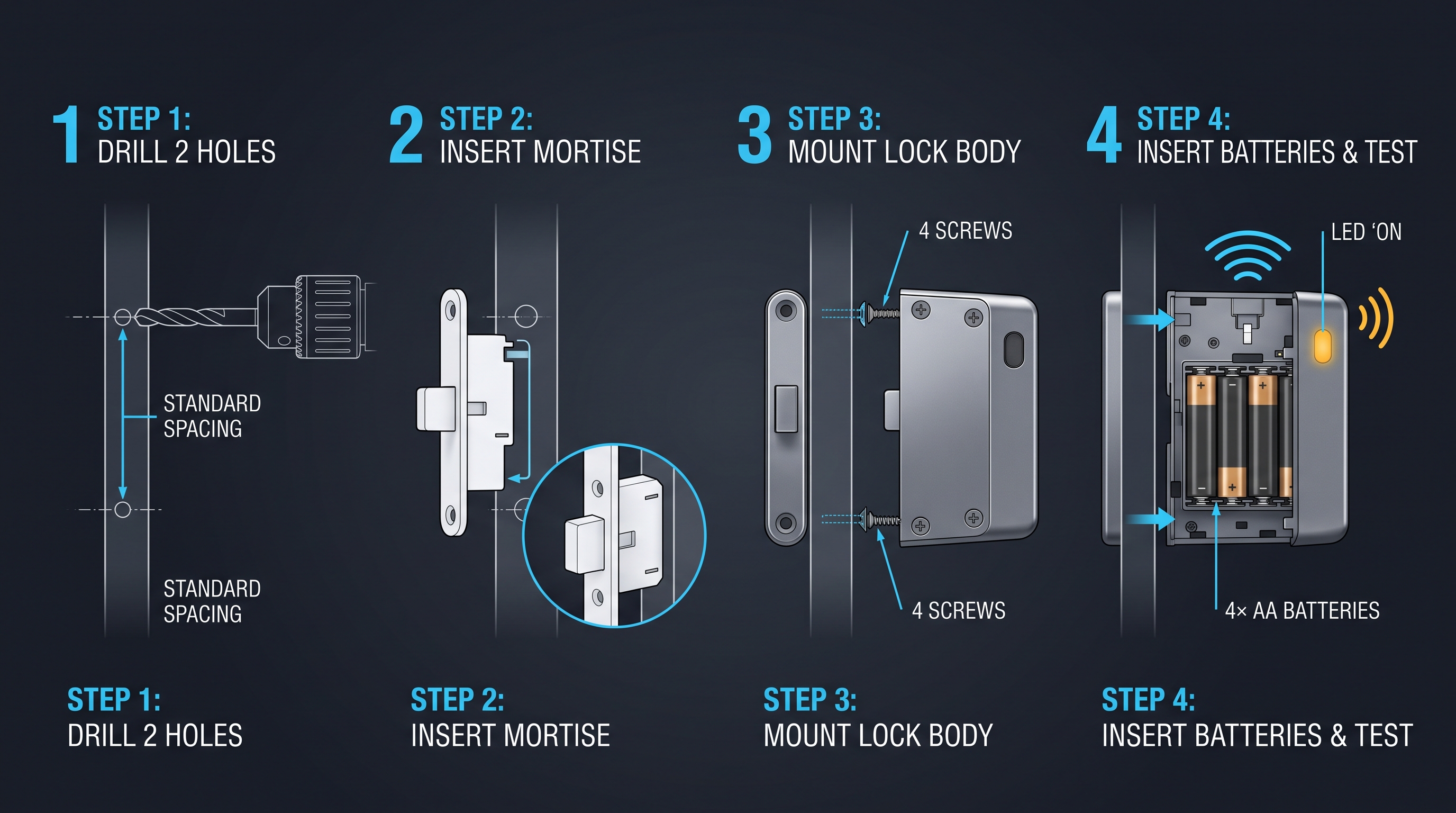
A cabinet lock with timer is a moderately complex retrofit that takes between 20 and 60 minutes to install on a typical single-door cabinet. Before mounting, verify that the door thickness is at least 16 mm for mortise models and 20 mm for rim-mounted cabinet lock with timer units, and that the cabinet frame offers clearance for the bolt throw of 10-18 mm. The installation sequence for a cabinet lock with timer is: mark the hole centers, drill the spindle and mounting holes, insert the locking mechanism, secure the strike plate on the frame, and mount the front keypad or reader. After hardware mounting, the cabinet lock with timer must be powered with fresh alkaline batteries, the real-time clock set to the correct local time, and the schedules programmed either on the keypad or through the mobile app. Multi-door deployments use a hub or controller that synchronizes the clock of every cabinet lock with timer over RS-485 or Wi-Fi, ensuring all doors follow identical schedules. Always test the cabinet lock with timer at least 10 open-close cycles before first operational use.
Pre-Installation Checklist for a Cabinet Lock with Timer
Before mounting a cabinet lock with timer, verify four things: door thickness, panel material, clearance, and power access. Mortise-style cabinet lock with timer units require a door thickness of at least 16 mm; rim-mounted units need 20 mm or more. The bolt throw of the cabinet lock with timer should be 10-18 mm and must align with the strike plate on the frame. If the cabinet lock with timer is networked, confirm Wi-Fi or Bluetooth range at the door location. Gather the tools you need: a drill with a hole saw, the paper template, screwdrivers, and a fresh set of AA or AAA batteries for the cabinet lock with timer.
Step-by-Step Cabinet Lock with Timer Installation
Installing a cabinet lock with timer follows a standard sequence. First, mark the hole centers using the paper template and drill the spindle hole and the mounting screw holes. Second, insert the body of the cabinet lock with timer through the door and secure it with the included screws. Third, mount the strike plate on the cabinet frame and verify the bolt seats cleanly with the door closed. Fourth, install the batteries, set the real-time clock to the correct local time, and program the initial schedule. Finally, test the cabinet lock with timer through at least ten open-close cycles, including one schedule boundary crossing, before declaring the installation complete.
Programming and Network Setup for a Cabinet Lock with Timer
Programming a cabinet lock with timer is done either on the device or through an app. On-device programming uses the keypad menu to set the clock, add schedules, and manage codes; app-based programming connects over Bluetooth 5.2 or Wi-Fi and pushes the same parameters remotely. For a multi-door deployment, a hub or controller synchronizes the clock of every cabinet lock with timer over RS-485 or Wi-Fi so all doors follow identical schedules. After setup, verify that the cabinet lock with timer shows the correct date and time, because a wrong clock defeats time-based access control regardless of how well the hardware is installed.
Choosing the Right Cabinet Lock with Timer: Selection Criteria
A cabinet lock with timer is selected on the basis of security level, timing precision, schedule capacity, and total cost of ownership. For basic protection, an entry-level cabinet lock with timer with a single daily window and a 3-5 N solenoid is sufficient. For controlled-substance and exam-material storage, buyers should require a cabinet lock with timer with audit logging, tamper detection, a 5-8 N motor bolt, and ±2 ppm clock accuracy. Timing flexibility matters most: a cabinet lock with timer that supports only daily schedules cannot handle weekend exceptions, whereas a cabinet lock with timer with weekly and holiday modes covers shift work and closures. Integration is the next consideration: a standalone cabinet lock with timer is programmed locally, while a networked cabinet lock with timer supports app control and remote audit retrieval over Bluetooth 5.2, Wi-Fi 802.11 b/g/n, Zigbee 3.0, or RS-485. Buyers should also verify certifications (CE, FCC, RoHS, and, where relevant, UL 294) and choose a cabinet lock with timer with 12-24 months of battery life and a mechanical key override.
Security Level of a Cabinet Lock with Timer
The required security level of a cabinet lock with timer depends on what it protects. For general storage, an entry-level cabinet lock with timer with a solenoid and 3-5 N of force is adequate. For medications, firearms, or exam materials, choose a cabinet lock with timer with a hardened motor bolt at 5-8 N, anti-pry housing, and tamper detection that triggers a buzzer and an audit event. A cabinet lock with timer for high-value assets should also include a mechanical key override so that a dead battery or controller failure never leaves contents inaccessible or, conversely, unlocked.
Timing Accuracy and Schedule Capacity of a Cabinet Lock with Timer
Timing precision is the defining specification of a cabinet lock with timer. Look for a real-time clock rated at ±2 ppm, which keeps the lock within 30 seconds per month, and confirm that the cabinet lock with timer supports the schedule types you need: daily, weekly, holiday, and one-time. Schedule capacity matters as well; a cabinet lock with timer with only a handful of slots cannot represent a full-year holiday calendar. If shifts or exceptions change often, select a cabinet lock with timer with at least 50 schedule slots and easy reprogramming.
Integration and Protocols for a Cabinet Lock with Timer
Integration decides how a cabinet lock with timer fits into your operations. A standalone cabinet lock with timer is programmed locally and requires no infrastructure. A Bluetooth-enabled cabinet lock with timer is convenient for nearby programming and firmware updates. A Wi-Fi, Zigbee, or RS-485 cabinet lock with timer plugs into a management platform that pushes schedules, retrieves audit logs, and issues remote overrides. Choose the cabinet lock with timer connectivity that matches your existing access control ecosystem, and verify standards such as BLE 5.2, Wi-Fi 802.11 b/g/n, Zigbee 3.0, or Z-Wave 908/868 MHz before purchase.
Total Cost of Ownership of a Cabinet Lock with Timer
The total cost of a cabinet lock with timer includes the unit price, batteries, installation labor, programming time, and any management software. A cheap cabinet lock with timer that must be reprogrammed by hand across 200 doors can cost more than a networked cabinet lock with timer with central management. Battery changes are a recurring cost: a cabinet lock with timer with 18-36 months of battery life halves maintenance visits compared with a 6-12 month model. When budgeting, multiply per-door cost by the number of doors and add a 10% allowance for spare cabinet lock with timer units and accessories.
Cabinet Lock with Timer Battery, Maintenance, and Troubleshooting
A cabinet lock with timer is a battery-operated device that typically runs for 12-24 months on four AA alkaline cells, depending on unlock frequency and actuation type. A solenoid cabinet lock with timer draws 150-400 mA per 0.2 second pulse, while a motor cabinet lock with timer draws 80-150 mA for 0.5 seconds, making motor models more battery-efficient over many cycles. Standby current for a modern cabinet lock with timer is 5-30 microamps in sleep mode, which is where most of the battery budget is spent, so scheduling and display settings that wake the lock frequently shorten battery life. Common cabinet lock with timer problems include clock drift, which is resolved by resynchronizing over Bluetooth, and door misalignment, which prevents the bolt from seating and triggers false alarms. Low battery on a cabinet lock with timer is announced by a red LED and an 85 dB buzzer at roughly 15% remaining charge, giving 3-6 weeks of warning. Maintenance is minimal: replace batteries annually or when alerted, clean the keypad with isopropyl alcohol, and re-verify the clock twice a year.
Battery Life of a Cabinet Lock with Timer
Battery life is the most common maintenance concern for a cabinet lock with timer. A solenoid-based cabinet lock with timer draws 150-400 mA during each 0.2 second activation pulse, while a motor-based cabinet lock with timer draws 80-150 mA over 0.5 seconds; despite the longer pulse, the motor model is often more efficient over thousands of cycles. Standby current is the bigger factor: a good cabinet lock with timer sleeps at 5-30 microamps, so a lock used a few times a day lasts 12-24 months, while heavy use in a rental facility may cut that to 6-12 months. Use fresh alkaline or lithium batteries, never rechargeable NiMH cells of unknown state.
| Battery Scenario | Cabinet Lock with Timer Drain | Expected Life |
|---|---|---|
| Solenoid, 10 cycles/day | 150-400 mA pulses | 6-12 months |
| Motor bolt, 10 cycles/day | 80-150 mA pulses | 12-18 months |
| Motor bolt, light use | 5-30 µA standby | 18-36 months |
| Hardwired 12 V DC | No battery | Unlimited |
Common Cabinet Lock with Timer Problems and Fixes
The most frequent cabinet lock with timer faults are clock drift, door misalignment, and battery depletion. Clock drift, where the cabinet lock with timer opens late or closes early, is fixed by resynchronizing over Bluetooth or replacing a worn RTC backup cell. Door misalignment, where the bolt does not seat in the strike plate, causes false alarm events and is corrected by adjusting the strike plate. A depleted battery on a cabinet lock with timer produces a red LED and an 85 dB buzzer around 15% remaining charge, giving three to six weeks of warning. If a cabinet lock with timer stops responding, remove the batteries for ten seconds, reinsert them, and reprogram if the schedule was lost.
Maintenance Schedule for a Cabinet Lock with Timer
A simple maintenance schedule keeps a cabinet lock with timer reliable. Quarterly: verify the clock against a trusted time source and confirm all schedules. Biannually: replace batteries proactively on high-use cabinet lock with timer units, clean the keypad with isopropyl alcohol, and lubricate the bolt with a dry PTFE lubricant. Annually: re-check door alignment, tighten mounting screws, export the audit log, and test the mechanical key override. Documenting each cabinet lock with timer service visit makes the maintenance schedule auditable and prevents small faults from turning into security gaps.
Cabinet Lock with Timer Audit Trails and Scheduled Event Logging
A cabinet lock with timer is an audit-capable locking device that records every access event in non-volatile memory, including the timestamp, the credential ID, the outcome, and the actuation method. Entry-level cabinet lock with timer units store 500 events, while premium models store 5,000-10,000 events, enough for a full year of heavy use. Because the audit trail of a cabinet lock with timer is written at the lock itself, it remains valid even if the network is offline, and events are uploaded to the management dashboard on the next sync. Scheduled event logging in a cabinet lock with timer shows which windows were actually used, whether any user accessed the cabinet outside approved hours, and how many attempts were denied. This data supports investigations, billing for rental usage, and compliance audits for pharmacy, firearm, and exam-material storage. A compliant cabinet lock with timer exports audit logs as CSV or JSON, and the clock timestamps are traceable to a synchronized time source with accuracy within ±30 seconds per month.
What the Audit Trail of a Cabinet Lock with Timer Records
Every audit-capable cabinet lock with timer records a timestamp, the credential ID or user number, the outcome (granted or denied), and the actuation method for each access attempt. Tamper events, battery alerts, and clock adjustments are also logged by a cabinet lock with timer. The log is stored in non-volatile memory, so events survive battery changes and network outages. A basic cabinet lock with timer stores 500 events, while premium models store 5,000-10,000, which is roughly a year of activity at 30 events per day.
Scheduled Event Reporting From a Cabinet Lock with Timer
The audit data from a cabinet lock with timer is most valuable when aggregated. A networked cabinet lock with timer uploads events to a dashboard that shows which schedules were actually used, whether anyone accessed the cabinet outside approved hours, and how many attempts were denied. Reports can highlight anomalies, such as a credential used at 02:00 when the cabinet lock with timer schedule says the cabinet should be locked. For rental billing, the cabinet lock with timer report provides a precise record of actual usage time, replacing estimates and disputes.
Compliance and Data Export From a Cabinet Lock with Timer
For regulated environments, a cabinet lock with timer with a solid audit trail supports compliance programs for pharmacy diversion control, firearm storage, and exam security. The cabinet lock with timer exports logs in CSV or JSON, and timestamps are traceable to a synchronized time source with accuracy within ±30 seconds per month. Retain audit exports for the required retention period, typically one to seven years depending on the regulation. Because the cabinet lock with timer writes events at the device, the audit record remains credible even if the network later fails, which is a key advantage over cloud-dependent logging.
Cabinet Lock with Timer vs Mechanical, Keypad, and Smart Alternatives
A cabinet lock with timer is often compared against mechanical timed locks, keypad locks with basic schedules, and full smart locks. A mechanical timed lock uses a wind-up timer and supports only a fixed countdown, so it cannot enforce daily or weekly schedules; a cabinet lock with timer, by contrast, can hold 20-100 programmable windows and revert automatically. A keypad lock with schedule restricts who can open but not when, whereas a cabinet lock with timer adds the time dimension and audit logging. A smart lock with an app may offer scheduling too, but many smart locks depend on cloud connectivity, while a good cabinet lock with timer continues enforcing schedules offline. In durability, a mechanical lock wins on simplicity, while a cabinet lock with timer wins on flexibility and accountability. For most organizations, the best value is a hybrid: a cabinet lock with timer with keypad or RFID credentials, a motor bolt, offline schedule enforcement, and optional app-based programming. The table below compares the three alternatives against a cabinet lock with timer across seven criteria.
Cabinet Lock with Timer vs Mechanical Timed Locks
A mechanical timed lock uses a wind-up spring or quartz movement to run a fixed countdown, typically 5 to 60 minutes, after which it locks or unlocks. It is cheap, battery-independent, and simple, but it cannot express daily or weekly schedules, cannot distinguish one user from another, and records nothing. A cabinet lock with timer provides all of those capabilities for a modest price premium. Choose a mechanical timed lock only when the sole requirement is a fixed duration and no audit or scheduling is needed; choose a cabinet lock with timer whenever policy, accountability, or flexibility matters.
Cabinet Lock with Timer vs Keypad Locks With Schedules
Some keypad locks offer a basic schedule, but it is usually a single open window and a single relock time. A dedicated cabinet lock with timer typically supports multiple windows, holiday exceptions, one-time credentials, and a full audit trail. If your requirement is simply a keypad that accepts codes during business hours, a scheduled keypad lock may be enough. If you need different rules per day, per user, or per date, the extra capability of a cabinet lock with timer justifies the cost difference.
Cabinet Lock with Timer vs Smart Locks
Smart locks with app control can also schedule access, but many depend on cloud connectivity to enforce or update schedules. When the network drops, a cloud-dependent smart lock may fail open or fail closed, depending on configuration. A cabinet lock with timer evaluates its schedule locally on the lock, so it keeps enforcing the policy during outages. The strongest design combines both: a cabinet lock with timer with local enforcement and optional cloud management for remote programming and audit retrieval.
When a Cabinet Lock with Timer Is the Best Choice
| Criterion | Cabinet Lock with Timer | Mechanical Timed Lock | Keypad Schedule Lock | Smart Cloud Lock |
|---|---|---|---|---|
| Daily/weekly schedules | Yes | No | Partial | Yes |
| Holiday and one-time windows | Yes | No | No | Yes |
| Timed auto-lock | Yes | Yes | Yes | Yes |
| Offline enforcement | Yes | Yes | Yes | No |
| Audit trail | Yes | No | Partial | Yes |
| Connectivity needed | Optional | None | None | Required |
| Typical price | $12-180 | $8-20 | $15-40 | $80-250 |
The table makes the trade-offs explicit. A cabinet lock with timer is the only option that combines scheduling, offline enforcement, timed auto-lock, and an audit trail in one device. For most organizations, that combination makes a cabinet lock with timer the best balance of capability and cost.
Cabinet Lock with Timer Pricing and Market Outlook
A cabinet lock with timer is priced between $12 and $180 for a single unit, depending on tier, and full enterprise systems run $150-400 per door. Basic mechanical countdown models cost $12-25. Digital electronic cabinet lock with timer units with keypad scheduling run $25-60. Networked cabinet lock with timer products with app control, audit logs, and Wi-Fi or Bluetooth connectivity cost $60-180. Full enterprise cabinet lock with timer systems, including a hub, management software, and RFID credentials, run $150-400 per door. Volume pricing for a 200-unit cabinet lock with timer project typically reduces per-door cost by 20-35% through OEM and bulk agreements. The cabinet lock with timer market is growing roughly 9-12% per year, driven by hybrid work, school security budgets, and pharmacy compliance mandates. The outlook is toward more integrated cabinet lock with timer platforms, with Matter and Zigbee support, AES-128 encryption, and cloud audit dashboards becoming standard features in premium tiers.
Cabinet Lock with Timer Price Ranges
Pricing for a cabinet lock with timer spans four tiers. Basic mechanical countdown models cost $12-25. Digital electronic cabinet lock with timer units with keypad scheduling run $25-60. Networked cabinet lock with timer products with app control, audit logs, and Wi-Fi or Bluetooth connectivity cost $60-180. Full enterprise systems, including a hub, management software, and RFID credentials, run $150-400 per door. Volume pricing for a 200-unit cabinet lock with timer project typically reduces per-door cost by 20-35%.
| Cabinet Lock with Timer Tier | Typical Price | Battery Life | Best Application |
|---|---|---|---|
| Mechanical countdown | $12-25 | 12+ months | Basic timing control |
| Digital standalone | $25-60 | 12-18 months | Offices, schools |
| Networked smart | $60-180 | 18-36 months | Enterprise, compliance |
| Full system per door | $150-400 | 24+ months | Multi-door deployments |
Market Trends for Cabinet Lock with Timer Products
The cabinet lock with timer market is growing roughly 9-12% per year, driven by hybrid work schedules, school security budgets, and pharmacy and firearm compliance mandates. Buyers increasingly demand a cabinet lock with timer with app programming, audit exports, and AES-128 encryption. Hardware costs continue to fall as RTC modules and low-power microcontrollers become cheaper, which pulls networked cabinet lock with timer pricing down toward the $50-80 range. Retrofit demand is strong because a cabinet lock with timer can replace an existing cam lock without replacing the cabinet.
Future Outlook for the Cabinet Lock with Timer
The future of the cabinet lock with timer lies in deeper integration. Matter and Zigbee support will let a cabinet lock with timer join broader smart building ecosystems, while cloud dashboards will make scheduled event reporting a standard feature even in mid-range products. Expect more cabinet lock with timer models with onboard temperature sensors for pharmaceutical cabinets, biometric options for high-security doors, and predictive low-battery alerts based on usage patterns. As compliance pressure rises, the cabinet lock with timer is likely to become a default component of cabinet security rather than a specialty product.
Part of this article content is generated by AI and optimized for professional accuracy and readability.
Not sure which sensor fits your project?
Talk to our mmWave application engineers for a free consultation.
Find the right presence sensor for your hotel project
Compare the 3 protocols, check hotel-specific case studies, and download the installation guide
Related products
3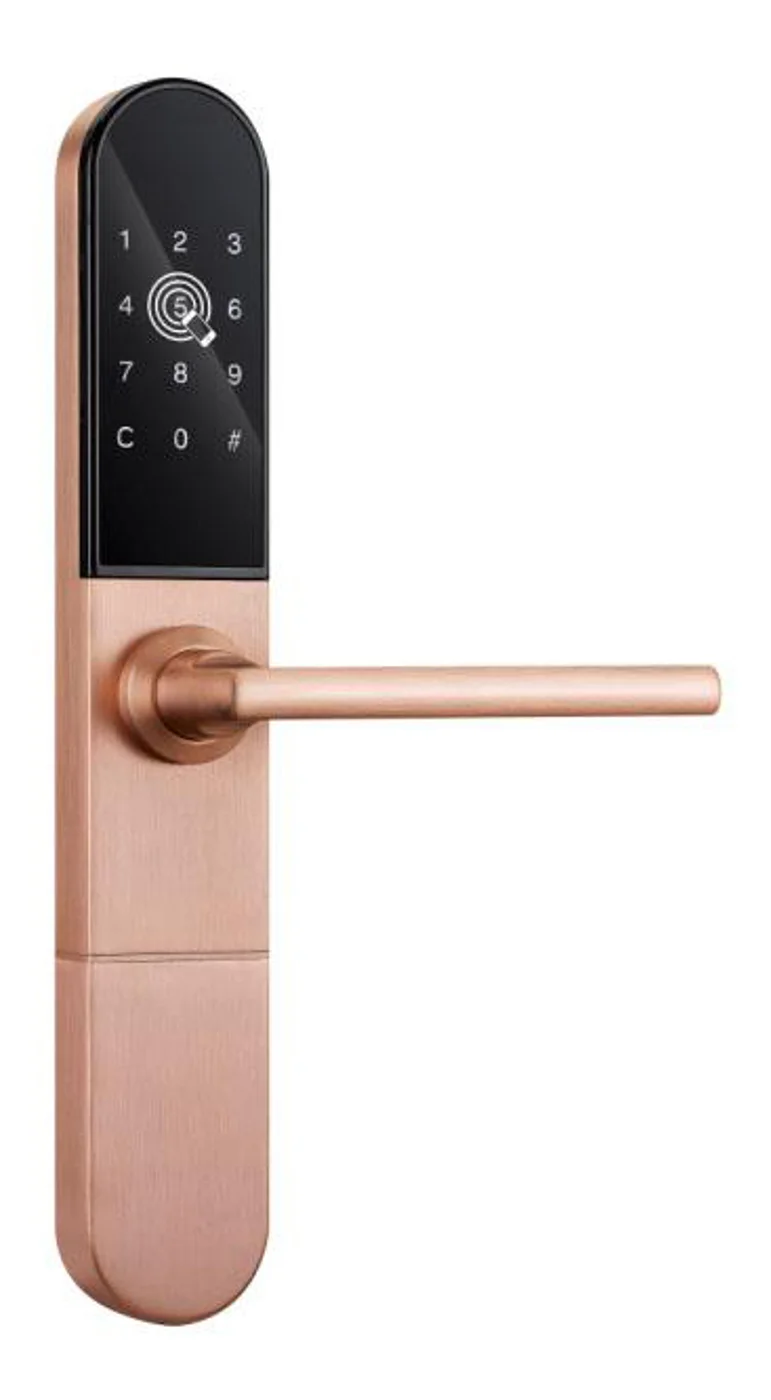
Smart Cabinet Lock — App-Managed, Multi-Site Dashboard
App-managed smart cabinet lock for office, parcel, and multi-site fleets. BLE app dashboard, audit trail, remote unlock, no per-lock server. Higher-tier chassis.
This page already points to it as the next recommended reference.
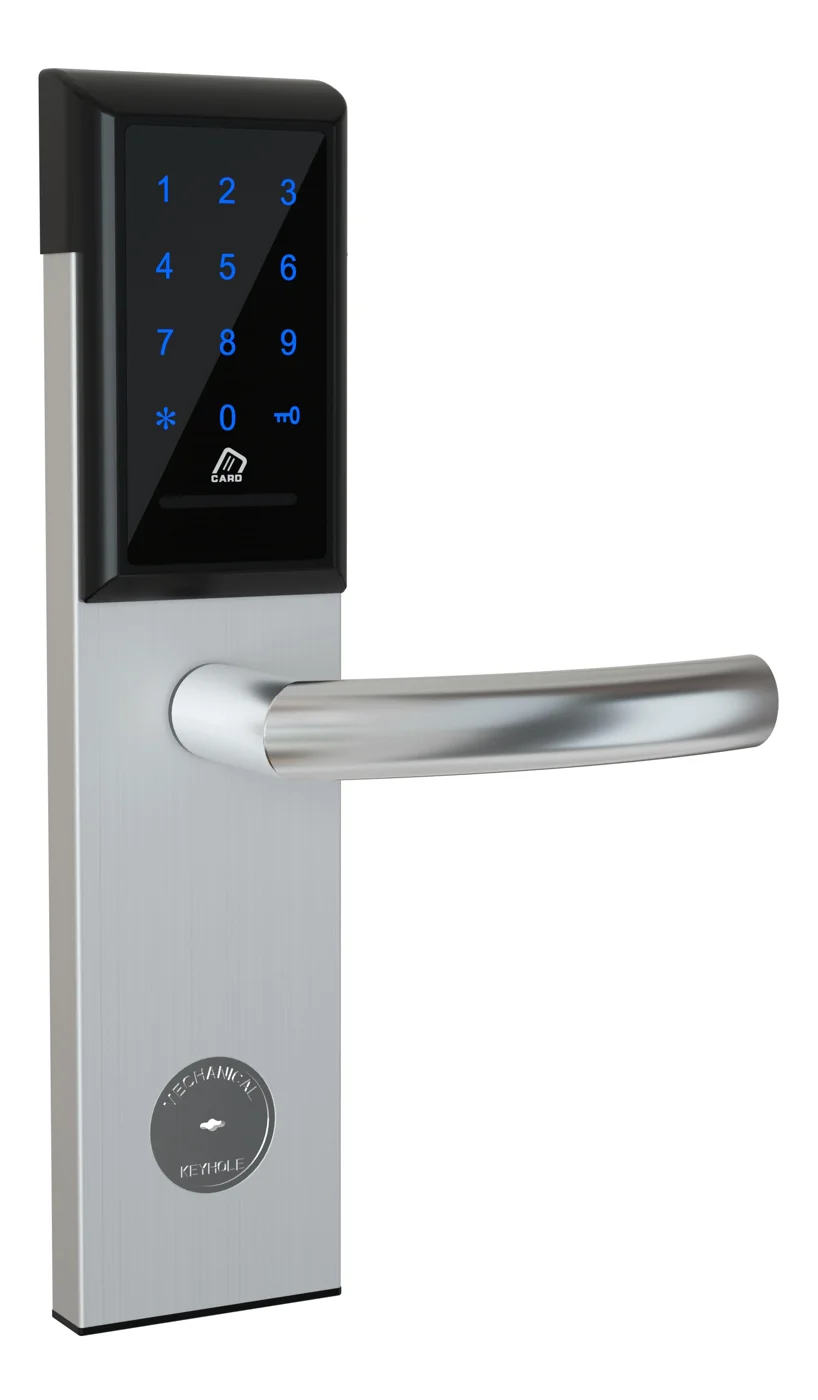
Office Cabinet Lock — PIN + Card for Filing & Pedestals
Offline PIN + card office cabinet lock for filing cabinets, pedestals, and drawers. Battery-powered 5-minute retrofit, no WiFi, no key management. CE/FCC/RoHS.
This page already points to it as the next recommended reference.
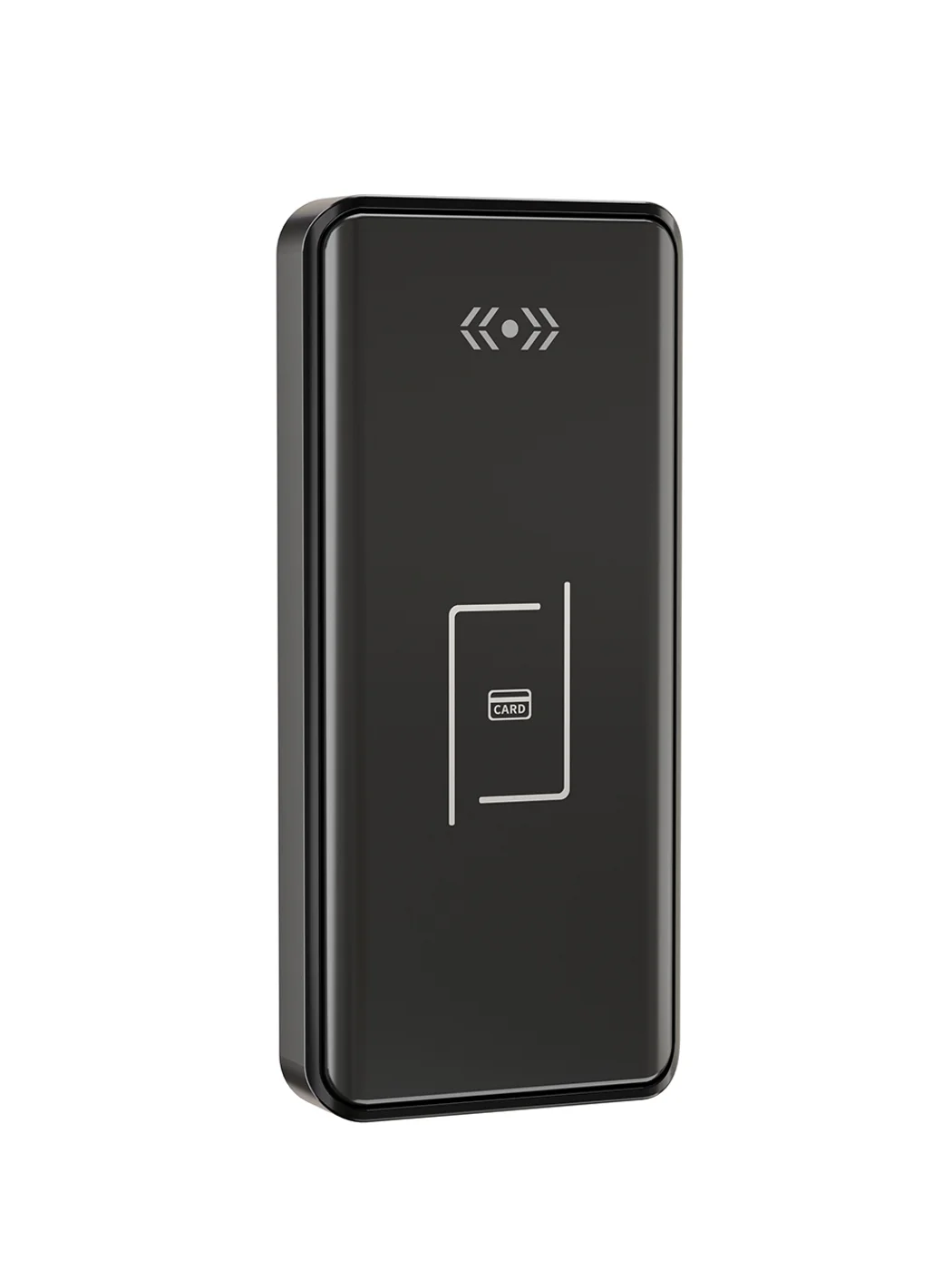
Gym Locker Lock — Offline Card, No WiFi Required
Offline card gym locker lock for fitness and pool lockers. MIFARE card, battery-powered 5-minute retrofit, no WiFi or server. Zinc alloy body, CE/FCC/RoHS.
This page already points to it as the next recommended reference.
Related blog posts
3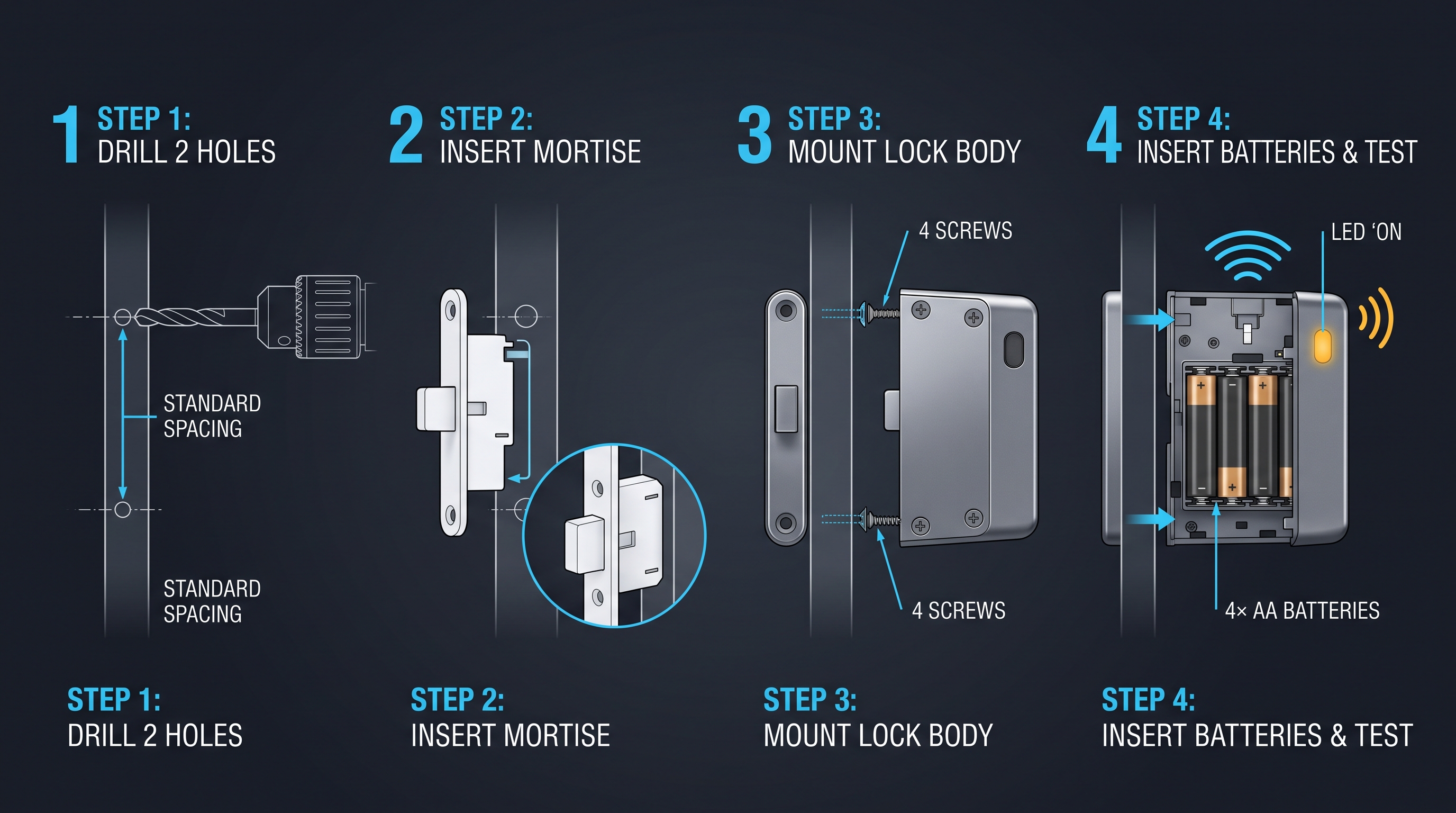
Cloud Cabinet Lock: Ultimate Guide to Cloud-Connected Cabinet Access Control
A comprehensive guide to cloud cabinet lock technology covering remote management, real-time audit trails, and multi-site cabinet access control for enterprises.
It supports the same product context: Smart Cabinet Lock — App-Managed, Multi-Site Dashboard, Office Cabinet Lock — PIN + Card for Filing & Pedestals, Gym Locker Lock — Offline Card, No WiFi Required.
Cam Lock Electronic: Modernizing the Workhorse Cabinet Lock
Cam lock electronic combines the classic cam lock form factor with RFID, keypad, and BLE credentials. Retrofit compatible with standard cylinder bores. Complete guide.
It supports the same product context: Smart Cabinet Lock — App-Managed, Multi-Site Dashboard, Office Cabinet Lock — PIN + Card for Filing & Pedestals, Gym Locker Lock — Offline Card, No WiFi Required.
Card Cabinet Lock: Ultimate Guide to Smart Card-Activated Cabinet Security Systems
Complete exploration of card cabinet lock technology including MIFARE, DESFire, NFC smartphone credentials, installation guides, security protocols, and enterprise integration strategies for card-based cabinet access.
It supports the same product context: Smart Cabinet Lock — App-Managed, Multi-Site Dashboard, Office Cabinet Lock — PIN + Card for Filing & Pedestals, Gym Locker Lock — Offline Card, No WiFi Required.
Specify your hotel project with our engineers
Send your room count, ceiling type, and protocol preference. We will return a sample plan and quote within 24 business hours.
- Move from general guidance into a product or application discussion.
- Use RFQ when pricing, drawings, MOQ, or launch timing needs structure.
- Keep a direct contact path visible for fast clarifications and handoff.