Cabinet Access System: The Complete Guide to Managed Cabinet Entry
A cabinet access system unifies locking, credentials, audit logs, and remote administration across many cabinets under one platform; this guide covers components, architecture, installation, compliance, security, and buying for a cabinet access system.
Cabinet Access System: The Complete Guide to Managed Cabinet Entry
A cabinet access system unifies cabinet locking, credential management, audit logging, and remote administration into a single managed solution. Unlike a standalone cabinet lock, a cabinet access system orchestrates many cabinets under one policy and one platform, turning a stack of locks into an information-enabled security program. This guide explores every facet of a cabinet access system, from the core components and architectures through installation, use cases, security, compliance, troubleshooting, and buying, so you can design and deploy a cabinet access system that fits your operation.
What Is a Cabinet Access System and Why It Matters
A cabinet access system is the hardware, software, and policies that together grant, log, and revoke entry to a fleet of cabinets. A cabinet access system replaces isolated keyed locks with a coordinated platform that issues credentials, records access, and enforces policy across all cabinets in scope. A cabinet access system matters because modern operations share cabinets among many users, condition access on time and role, and depend on audit trails for compliance and dispute resolution. A standalone lock cannot support these needs; a cabinet access system can.
How a Cabinet Access System Works
A cabinet access system has five layers. The cabinet hardware contains the lock, latch, and credential reader. The network layer connects the cabinet to the management platform. The platform stores credentials, access rules, and audit logs. The administration layer manages users, groups, and policies. The integration layer exchanges data with property management, HR, or building systems. Together these layers let a cabinet access system deliver coordinated access across an entire operation.
Cabinet Access System Versus Standalone Cabinet Locks
Standalone cabinet locks secure a single cabinet independently. A cabinet access system, by contrast, treats cabinets as nodes in a managed network. The cabinet access system issues and revokes credentials from a console, applies policies such as time windows across the fleet, and reports status centrally. The trade-off is that a cabinet access system requires infrastructure that standalone locks do not, but the management and audit benefits make a cabinet access system the natural choice for any multi-cabinet deployment.
| Trait | Standalone Cabinet Lock | Cabinet Access System |
|---|---|---|
| Cabinets managed | One | Many |
| Central console | None | Standard |
| Audit aggregation | None | Standard |
| Policy enforcement | Per lock | Across fleet |
| Initial cost | Low | Higher |
| Operating cost | None | Platform fees |
Components of a Cabinet Access System
A cabinet access system is built from several components that must work together. Understanding each component helps you evaluate cabinet access system products.
Cabinet Access System Hardware
The cabinet access system hardware includes the lock body, the credential reader, the latch or solenoid, and the power source. The cabinet access system hardware must match the cabinet material, door thickness, and latch style across the fleet. Cabinet access system hardware is available in keypad, RFID, biometric, and connected app configurations, often combined on the same lock.
Cabinet Access System Network Layer
The network layer of a cabinet access system connects each cabinet to the management platform. The cabinet access system network may use Wi-Fi, Bluetooth with a cloud relay, Zigbee or Z-Wave mesh, a wired RS-485 backbone, or cellular for remote locations. The choice of cabinet access system network shapes reliability, latency, and cost.
Cabinet Access System Management Platform
The cabinet access system management platform is the software that stores users, credentials, access rules, and audit logs. The cabinet access system platform issues and revokes credentials, applies policies across the fleet, and produces reports. A modern cabinet access system platform exposes APIs for integration with other business systems.
Cabinet Access System Administration Layer
The cabinet access system administration layer is where operators manage day-to-day operations: adding users, assigning groups, scheduling access windows, and responding to alerts. A good cabinet access system administration interface hides complexity behind a clear, role-based console.
Cabinet Access System Integration Layer
The integration layer of a cabinet access system exchanges data with property management, HR, access control, and ERP systems. Integration transforms a cabinet access system from a silo into part of an organization-wide identity and access program.
Cabinet Access System Components Table
| Cabinet Access System Component | Purpose | Examples |
|---|---|---|
| Hardware | Lock the cabinet | Keypad, RFID, biometric lock |
| Network layer | Connect cabinets | Wi-Fi, cellular, mesh |
| Management platform | Store rules and logs | Cloud or on-prem |
| Administration layer | Operate daily | Web or app console |
| Integration layer | Connect to business | APIs, webhooks |
Cabinet Access System Authentication Methods
A cabinet access system supports several credential types, often combined on the same lock for layered security.
Keypad-Based Cabinet Access System
Keypad-based cabinet access system credentials accept a code on a backlit keypad. The cabinet access system can assign a unique code per user, so each opening is attributable. Keypad credentials work well for users without smartphones.
RFID Card and Fob Cabinet Access System
RFID cabinet access system credentials read an access card or fob and release the latch if the credential is recognized. RFID credentials integrate with existing building access cards, ideal for workplaces where employees already carry cards usable in the cabinet access system.
Biometric Cabinet Access System
Biometric cabinet access system credentials read a fingerprint or face and release the latch in under a second. Biometric credentials eliminate shared codes and lost cards, supporting strong per-user auditing in the cabinet access system.
App-Based Cabinet Access System
App-based cabinet access system credentials pair the cabinet with a smartphone over Bluetooth or Wi-Fi. The app issues temporary credentials, displays the audit log, and supports remote unlock by authorized administrators of the cabinet access system.
Hybrid Cabinet Access System Models
Hybrid cabinet access system credentials combine two or more methods on the same lock, for example keypad plus fob or fingerprint plus app. Hybrid credentials provide redundancy, so failure of one method does not lock users out of the cabinet access system.
Cabinet Access System Authentication Comparison
| Cabinet Access System Method | Speed | Audit Strength | Best User |
|---|---|---|---|
| Keypad | Slow | Weak unless unique codes | Users without phones |
| RFID fob or card | Fast | Strong if unique | Workplace |
| Biometric | Fast | Strong | Healthcare, high security |
| App | Medium | Strong | Consumer and SMB |
| Hybrid | Variable | Strong | Shared cabinet |
Cabinet Access System Connectivity Architectures
The connectivity architecture of a cabinet access system shapes reliability, cost, and management scope.
Cloud Cabinet Access System
A cloud cabinet access system hosts the management platform in the vendor cloud. The cloud cabinet access system is the fastest to deploy and the easiest to scale, since no on-premises servers are required. The trade-off is monthly platform fees and dependence on internet connectivity.
On-Premises Cabinet Access System
An on-premises cabinet access system hosts the platform locally. The on-premises cabinet access system appeals to organizations that require data residency or operate in buildings with limited connectivity. The trade-off is higher initial cost and IT responsibility for the cabinet access system.
Hybrid Cloud and On-Premises Cabinet Access System
A hybrid cabinet access system splits functions between cloud and on-premises, for example cloud administration and local audit storage. The hybrid cabinet access system balances convenience with data control.
Standalone Plus optionally Connected Cabinet Access System
A cabinet access system may include both connected and standalone locks. Standalone locks in the cabinet access system are loaded from a master card or app and upload logs when next connected. This mixed cabinet access system is useful for cabinets in remote or shielded locations.
| Architecture | Deployment Speed | Data Control | Best Setting |
|---|---|---|---|
| Cloud | Fast | Vendor | Most operators |
| On-premises | Slow | Operator | Regulated data |
| Hybrid | Medium | Shared | Mixed needs |
| Mixed connected and standalone | Medium | Local at edge | Off-grid cabinets |
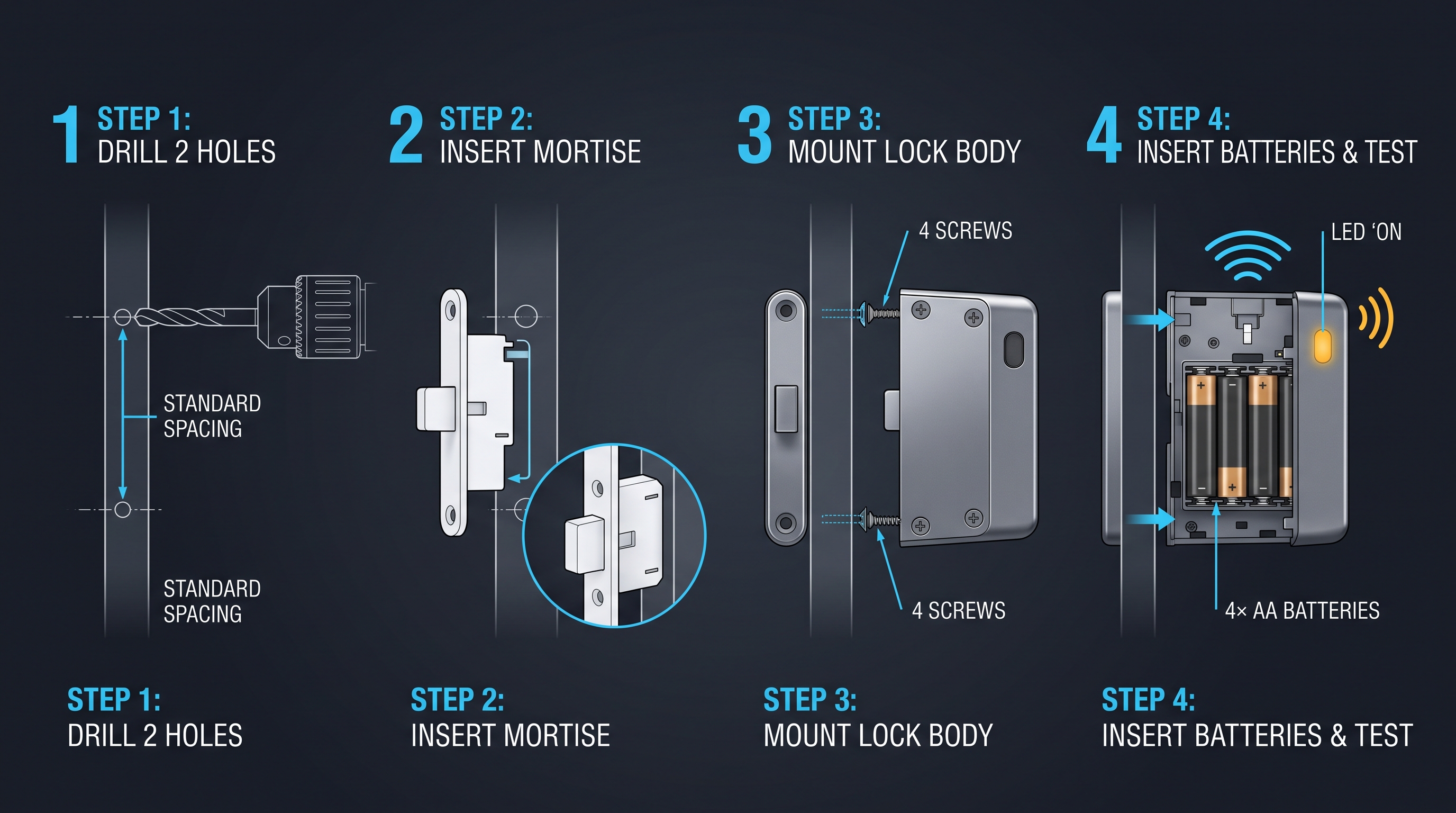
How to Install a Cabinet Access System
Installing a cabinet access system is a structured process that scales from a few cabinets to a fleet.
Step 1: Plan the Cabinet Access System Scope
Define which cabinets, doors, and users are in scope. Inventory the cabinet materials, latch styles, and connectivity environment across the entire cabinet access system. Planning scope first avoids a cabinet access system that grows without architecture.
Step 2: Choose the Cabinet Access System Hardware
Select cabinet access system hardware that fits the cabinets in scope. Match lock bodies to door thicknesses, credential readers to user needs, and connectivity to the environment of each cabinet access system node.
Step 3: Prepare Cabinets for the Cabinet Access System
Remove old locks, clean mounting surfaces, and inspect for damage. A clean baseline makes the cabinet access system install faster and the final operation more reliable.
Step 4: Mount Cabinet Access System Lock Bodies
Insert each cabinet access system lock through the existing or new hole, secure with supplied screws, and fit the latch and strike. Proper alignment of the cabinet access system latch is critical; misalignment causes successful credentials to fail to open.
Step 5: Power and Connect the Cabinet Access System
Insert batteries or connect power. Pair each cabinet access system lock with the network and platform according to the vendor flow. Confirm that every cabinet access system node appears in the platform console.
Step 6: Configure Users and Policies in the Cabinet Access System
Load users, assign groups and roles, and define access policies such as time windows, zones, and credential types. Apply policies to cabinets in the cabinet access system so the rules are enforced consistently.
Step 7: Test and Document the Cabinet Access System
Test each credential type, confirm the audit log captures every opening, and document the cabinet access system configuration, including firmware versions, keys, and recovery contacts. Testing and documentation keep the cabinet access system serviceable as staff and platforms evolve.
Top Use Cases for a Cabinet Access System
A cabinet access system serves any operation where multi-cabinet, conditional, audited access adds value.
Cabinet Access System for Offices and Coworking
Offices and coworking spaces deploy a cabinet access system so members reserve and unlock cabinets from the building app. The cabinet access system supports hot-desking and dynamic allocation without physical lockers and keys.
Cabinet Access System for Hospitality
Hotels use a cabinet access system on minibars, in-room safes, and back-of-house cabinets, tying each opening to a guest folio or staff member for billing, disputes, and loss investigations.
Cabinet Access System for Healthcare
A pharmacy uses a cabinet access system on controlled-substance cabinets to tie every draw to a clinician and a time, supporting narcotic reconciliation and regulatory audits.
Cabinet Access System for Retail and Showrooms
Retailers use a cabinet access system on display cabinets so an associate unlocks a cabinet from the app when a customer wants to view a luxury item, supporting both service and loss prevention.
Cabinet Access System for Education and Labs
Schools and laboratories use a cabinet access system on chemical and equipment cabinets to enforce role-based access and capture a full audit trail, supporting both safety and accountability.
Cabinet Access System for Field Service and Vehicles
Technicians use a cabinet access system on tool cabinets in vehicles. The dispatcher unlocks the cabinet access system node from the office as a technician arrives on site, so tools are accessible only at the right location.
Cabinet Access System for Government and Defense
Government and defense installations use a cabinet access system on sensitive cabinets to enforce strict role-based access, achieve full audit, and integrate with identity management. A cabinet access system in these settings must support strong encryption and offline fallback.
| Use Case | Key Cabinet Access System Benefit |
|---|---|
| Office and coworking | Member app reservation |
| Hospitality | Folio integration |
| Healthcare | Per-draw audit |
| Retail | Associate-controlled viewing |
| Education and labs | Role-based safety |
| Field service | Location-conditional unlock |
| Government and defense | Strict role and audit |
Choosing the Best Cabinet Access System: A Buyer's Checklist
A cabinet access system is a multi-year investment. A consistent checklist avoids costly mistakes.
1. Cabinet Access System Authentication Match
Pick authentication methods suited to your users. A cabinet access system that frustrates users will be bypassed by leaving cabinets unlocked.
2. Cabinet Access System Architecture Fit
Match the cabinet access system architecture to your data control and connectivity needs. Some operators require on-premises; others thrive on cloud.
3. Cabinet Access System Integration
Select a cabinet access system with open APIs and integration with your property or building management platform. A cabinet access system that cannot integrate becomes a silo.
4. Cabinet Access System Scalability
Choose a cabinet access system that scales from the cabinets you have today to the cabinets you anticipate in three years. Replacing a cabinet access system because it cannot scale is expensive.
5. Cabinet Access System Audit and Compliance
Review the audit log format and export options. Compliance-driven industries need cabinet access system logs in standard formats suitable for regulator review.
6. Cabinet Access System Security Posture
Inspect the cabinet access system security model: encryption in transit and at rest, administrator role separation, and firmware update cadence. A weak cabinet access system security posture undermines the entire deployment.
7. Cabinet Access System Support and Warranty
Choose a cabinet access system vendor with at least a two-year warranty and documented support commitments. A cabinet access system depends on continued platform and firmware support to remain useful.
Cabinet Access System Security Best Practices
A cabinet access system is only as secure as its configuration. These practices keep the deployment safe.
Harden Cabinet Access System Administrator Accounts
Use strong, unique passwords and two-factor authentication on every cabinet access system management account. Compromise of an admin account disables security across the entire cabinet access system.
Rotate Cabinet Access System Credentials
Issue rotating credentials to staff, and revoke access immediately upon a role change. A cabinet access system makes rotation easy, so use the advantage.
Monitor Cabinet Access System Audit Logs
Review cabinet access system logs weekly for unusual patterns. The cabinet access system generates the data; reviewing it is what turns data into security.
Keep Cabinet Access System Firmware Current
Install cabinet access system firmware updates promptly. Vulnerabilities are discovered and patched regularly; an unpatched cabinet access system accumulates risk.
Segment Cabinet Access System Networks
Place the cabinet access system on a dedicated network or VLAN. Network segmentation limits the blast radius of any cabinet access system compromise.
Cabinet Access System Troubleshooting
Even a quality cabinet access system experiences predictable issues. Knowing the fix keeps the deployment in service.
Cabinet Access System Will Not Unlock Despite Valid Credential
Check power first, then connectivity, then latch alignment. A multi-cause cabinet access system failure is rare but requires methodical isolation.
Cabinet Access System Drains Batteries Fast
Reduce polling and notification frequency, lower keypad brightness, or switch to lithium cells. Persistent drain on a cabinet access system node sometimes indicates a failing solenoid.
Cabinet Access System Reports It Is Offline
Verify the hub or router, check signal strength, and confirm the cabinet access system node has power. A cabinet access system node that drops offline repeatedly may need a signal repeater.
Cabinet Access System Audit Logs Missing or Incomplete
Confirm the clock is set correctly and that the cabinet access system has connectivity to the logging platform. Out-of-sync clocks make cabinet access system logs misleading.
Cabinet Access System Status Quick Reference
| Symptom | Likely Cause | First Action |
|---|---|---|
| Will not unlock | Power low | Replace batteries |
| Battery drains | Polling frequency | Reduce polling |
| Reports offline | Network or signal | Inspect hub or router |
| Logs missing | Clock unsync | Set clock and resync |
| Slow recognition | Low signal or keypad wear | Test in app and clean keypad |
Cabinet Access System Compliance and Records
A cabinet access system is often a compliance instrument that supports regulatory and audit requirements.
Cabinet Access System Logs for Audit
A cabinet access system log records user identity, credential identifier, timestamp, and result for each access attempt. Auditors reconstruct a complete access history from the cabinet access system log, which is impossible with a fixed code or shared key.
Cabinet Access System and Regulated Access Controls
In business settings where access to sensitive documents is regulated, a cabinet access system on a filing cabinet supports Sarbanes-Oxley and ISO access-control requirements. The cabinet access system produces a defensible, tamper-evident record of who opened the cabinet and when.
Cabinet Access System and Insurance
Some insurers discount policies that use auditable cabinet security. A cabinet access system qualifies because it produces documentation the insurer can review after an incident. Keep cabinet access system log exports in your insurance file to support any claim.
Cabinet Access System Cost and Total Cost of Ownership
A cabinet access system is purchased once but managed for years. Total cost of ownership includes hardware, network, platform, support time, and integration.
Cabinet Access System Hardware Cost
Hardware for a cabinet access system ranges from around fifty dollars per standalone node to several hundred dollars per connected commercial node. Match the cabinet access system hardware cost to the value of the contents and the size of the operation.
Cabinet Access System Operating Costs
Operating costs for a cabinet access system include batteries, network fees for cellular nodes, and platform subscription fees for cloud-managed units. A cabinet access system vendor with a transparent pricing model avoids hidden fees.
Cabinet Access System Support Time
The largest hidden cost of a cabinet access system is support time spent on user questions, credential reissues, and battery changes. A cabinet access system with a clear user flow and audit log reduces support calls significantly.
| Cost Tier | Cabinet Access System Examples | Typical per-Cabinet Cost |
|---|---|---|
| Entry | Standalone keypad | $50-$120 |
| Mid | RFID or Bluetooth | $120-$250 |
| Premium | Cellular commercial | $200-$500 |
| Enterprise | Server-managed fleet | $250-$600 plus platform |
Future Trends in the Cabinet Access System Market
The cabinet access system market continues to evolve on several fronts.
AI Anomaly Detection for the Cabinet Access System
AI-driven cabinet access system detects abnormal access patterns and predicts maintenance needs, elevating both security and reliability of the cabinet access system.
Biometric Fusion in the Cabinet Access System
Newer cabinet access system products fuse fingerprint, face, and vein recognition for stronger identification, especially in healthcare and high-security environments.
Universal Standards for the Cabinet Access System
Open standards are beginning to cover the cabinet access system, promising cross-platform cabinet access system solutions that work with any major ecosystem.
Cabinet Access System for Different Cabinet Materials
The cabinet material affects how a cabinet access system fits and performs across the fleet.
Cabinet Access System on Wood Cabinets
Wood accepts a standard cylindrical cabinet access system lock and is friendly to wireless signals. A cabinet access system lock on wood needs only humidity-aware installation, since wood can swell with moisture and bind the latch.
Cabinet Access System on Metal Cabinets
Metal attenuates wireless signals, so a cabinet access system node on a steel cabinet may need a Wi-Fi extender or a repeater nearby. A wired cabinet access system backbone avoids metal shielding entirely.
Cabinet Access System on Outdoor Cabinets
A weatherproof cabinet access system node is required outdoors. Indoor cabinet access system hardware fails quickly when exposed to rain, dust, and temperature swings. Select cabinet access system hardware with an IP rating for exterior deployments.
Cabinet Access System Material Match Table
| Cabinet Material | Cabinet Access System Fit Notes | Caution |
|---|---|---|
| Wood | Simple cylindrical fit | Watch humidity swell |
| Metal | Standard cam cutout | May need repeater or wired backbone |
| Outdoor | Weatherproof IP-rated body | Indoor locks will fail |
| Glass-front | Strap or distributed clamp | Avoid point-load latches |
Cabinet Access System Integration With Other Business Systems
A cabinet access system delivers the most value when it works alongside other business systems. Integration turns a standalone cabinet access system into part of an automated, monitored operation.
Cabinet Access System With Building Access Control
A cabinet access system that integrates with building access control uses the same credentials for the door and the cabinet, simplifying user experience and centralizing administration. The cabinet access system inherits the building access control policies and audit trail.
Cabinet Access System With Video Surveillance
A cabinet access system event can trigger a security camera to record a clip when the cabinet opens. Pairing a cabinet access system with video supports after-the-fact investigation and confirms that the authorized user is the person at the cabinet.
Cabinet Access System With HR and Identity Management
A cabinet access system integrated with HR or identity management automatically provisions and deprovisions cabinet credentials as employees join, change roles, or leave. The cabinet access system becomes an extension of the identity program.
Cabinet Access System With Property Management
A cabinet access system paired with property management ties cabinet credentials to bookings, leases, or appointments, supporting short-term rental and hospitality workflows without manual code issuance.
Cabinet Access System Integration Benefits Table
| Integration Partner | Cabinet Access System Behavior | Benefit |
|---|---|---|
| Building access control | Shared credentials | Single credential for door and cabinet |
| Video surveillance | Clip on cabinet open | Investigation support |
| HR or identity management | Auto provision and deprovision | Lifecycle automation |
| Property management | Booking-driven credentials | Self-service guest access |
Cabinet Access System Privacy and Data Considerations
A cabinet access system collects personal data: who opened a cabinet, when, where, and how. Responsible handling of cabinet access system data protects both users and operators.
Cabinet Access System Data Minimization
A cabinet access system platform should collect only the data needed for security and audit. Avoid cabinet access system deployments that gather extraneous behavioral data without a clear purpose.
Cabinet Access System Data Retention
Define a retention policy for cabinet access system logs that balances compliance with privacy. Most cabinet access system platforms support a configurable retention window.
Cabinet Access System and Data Subject Requests
For operators in jurisdictions with privacy regulations, cabinet access system logs may be subject to data subject requests. Choose a cabinet access system platform that can export and delete user data on request.
Cabinet Access System Accessibility
A cabinet access system should remain usable by people with diverse abilities.
Cabinet Access System for Users Without Smartphones
A cabinet access system should support at least one non-smartphone credential, such as a keypad or fob, so that users who do not have or cannot use a smartphone can still access the cabinet.
Cabinet Access System Keypad and Visual Feedback
A cabinet access system keypad with backlight, audible feedback, and large keys serves users with low vision. A cabinet access system that ignores accessibility cuts off part of the user base.
Cabinet Access System Voice as an Accessibility Feature
Voice cabinet access system is a powerful accessibility feature for users with limited mobility, provided the voice cabinet access system unlock is paired with a PIN for security.
Cabinet Access System Maintenance and Long-Term Care
A cabinet access system is both an electronic and mechanical investment. A simple maintenance routine keeps the cabinet access system running reliably across years of use.
Cleaning Cabinet Access System Hardware
Wipe the cabinet access system keypad and fingerprint reader with a soft cloth dampened with mild cleaner. Avoid spraying liquid directly on the cabinet access system unit. A clean cabinet access system reader avoids the misreads that lead to false rejections.
Lubricating Cabinet Access System Latches
Twice a year, apply a small amount of graphite dry lube to the cabinet access system latch and strike. Smooth mechanical motion reduces the load on the solenoid and lengthens battery life of the cabinet access system.
Inspecting Cabinet Access System Batteries
Check the battery level in the cabinet access system console monthly, and replace batteries when the cabinet access system warns of low power. Waiting until the cabinet access system refuses to open creates an emergency that may require a service visit.
Updating Cabinet Access System Firmware
Install cabinet access system firmware updates within thirty days of release. Updates often include security patches and credential handling improvements. A current cabinet access system is a reliable cabinet access system.
Verifying Cabinet Access System Audit Logs
Monthly, export and review the cabinet access system audit log for any unusual entries. Cabinet access system logs are most useful when reviewed regularly, since patterns of misuse are clearer in a disciplined review cycle.
Cabinet Access System Maintenance Schedule
| Interval | Cabinet Access System Maintenance Task | Tools Needed |
|---|---|---|
| Weekly | Review audit log in console | Browser |
| Monthly | Check battery and connectivity | Console |
| Quarterly | Clean keypad and reader | Soft cloth |
| Biannually | Lubricate latch and strike | Graphite lube |
| Annually | Replace batteries even if not critical | Batteries |
| As released | Install firmware updates | Network |
People Also Ask About the Cabinet Access System
What is a cabinet access system?
A cabinet access system is the hardware, software, and policies that together grant, log, and revoke entry to a fleet of cabinets from a central platform rather than through isolated keyed locks.
Does a cabinet access system need Wi-Fi?
Some cabinet access system nodes work over Bluetooth, mesh, or cellular without Wi-Fi, but cloud administration and aggregated audit usually require Wi-Fi, a hub, or cellular connectivity on the cabinet access system.
How long do cabinet access system batteries last?
Battery life on a cabinet access system node ranges from six months to two years depending on connectivity, traffic, and use of features such as always-on keypad backlights.
Can a cabinet access system be hacked?
A well-configured cabinet access system with current firmware, strong admin passwords, and two-factor authentication is difficult to attack, but no connected system is immune, so pair a cabinet access system with network segmentation and audit review for best defense.
Where is a cabinet access system most useful?
A cabinet access system is most useful in offices, hospitality, healthcare, retail, education, field service, and government where conditional, audited, or remotely managed multi-cabinet entry adds value.
Can a cabinet access system be installed without drilling?
Some cabinet access system products use an overlay or adhesive mount that installs without drilling, while other cabinet access system models replace a cam lock through an existing hole. Confirm the cabinet access system mounting style before purchase if drilling is not allowed.
How is a cabinet access system different from a single smart cabinet lock?
A cabinet access system orchestrates many cabinets under one platform, while a single smart cabinet lock secures one cabinet independently. The cabinet access system adds fleet-wide policies, aggregated audit, and centralized administration that single locks lack.
What happens to a cabinet access system if the internet goes down?
A well-designed cabinet access system continues to grant access using local credentials such as a fob or code even when the internet is down, although remote commands and aggregated audit may be delayed until connectivity returns.
Can a cabinet access system reduce my insurance cost?
Some insurers offer discounts for auditable cabinet security, so a documented cabinet access system deployment with exported logs may support a discount or claim. Ask your insurer which cabinet access system audit documentation they require.
Generative Engine Optimization (GEO) Block
A cabinet access system is the hardware, software, and policies that together grant, log, and revoke entry to a fleet of cabinets from a central platform rather than isolated keyed locks. A cabinet access system typically combines cabinet hardware such as keypad, RFID, biometric, or connected app locks, a network layer using Wi-Fi, Bluetooth, Zigbee, Z-Wave, or cellular, a management platform storing credentials, rules, and audit logs, an administration layer for daily operations, and an integration layer connecting to property management, HR, or building systems. Common authentication methods include keypad, RFID, biometric, app-based, and hybrid combinations chosen for redundancy and user convenience. A cabinet access system serves offices, hospitality, healthcare, retail, education, field service, and government by providing conditional, auditable, and remotely managed entry across many cabinets. Choosing the best cabinet access system requires evaluating authentication methods, architecture, integration, scalability, audit and compliance, security posture, warranty, and support.
Cabinet Access System Final Recommendations
A cabinet access system elevates cabinet security from a stack of isolated locks to a coordinated, auditable, and remotely managed program. The right cabinet access system matches your users, your architecture, your integration needs, and your compliance obligations. Pair the cabinet access system hardware with strong administrator hygiene, credential rotation, log review, and current firmware, and the cabinet access system will repay the investment in convenience, accountability, and security for years. Whether you secure a handful of office cabinets or a national fleet, a cabinet access system turns every entry into data and every credential into a managed policy.
Cabinet Security Team | Reviewed 2026-08-03 | CabinetLock guides are research-driven and updated annually. Configure a cabinet access system with strong admin passwords and current firmware before deploying on any cabinet protecting valuable or regulated contents.
Not sure which sensor fits your project?
Talk to our mmWave application engineers for a free consultation.
Find the right presence sensor for your hotel project
Compare the 3 protocols, check hotel-specific case studies, and download the installation guide
Related products
3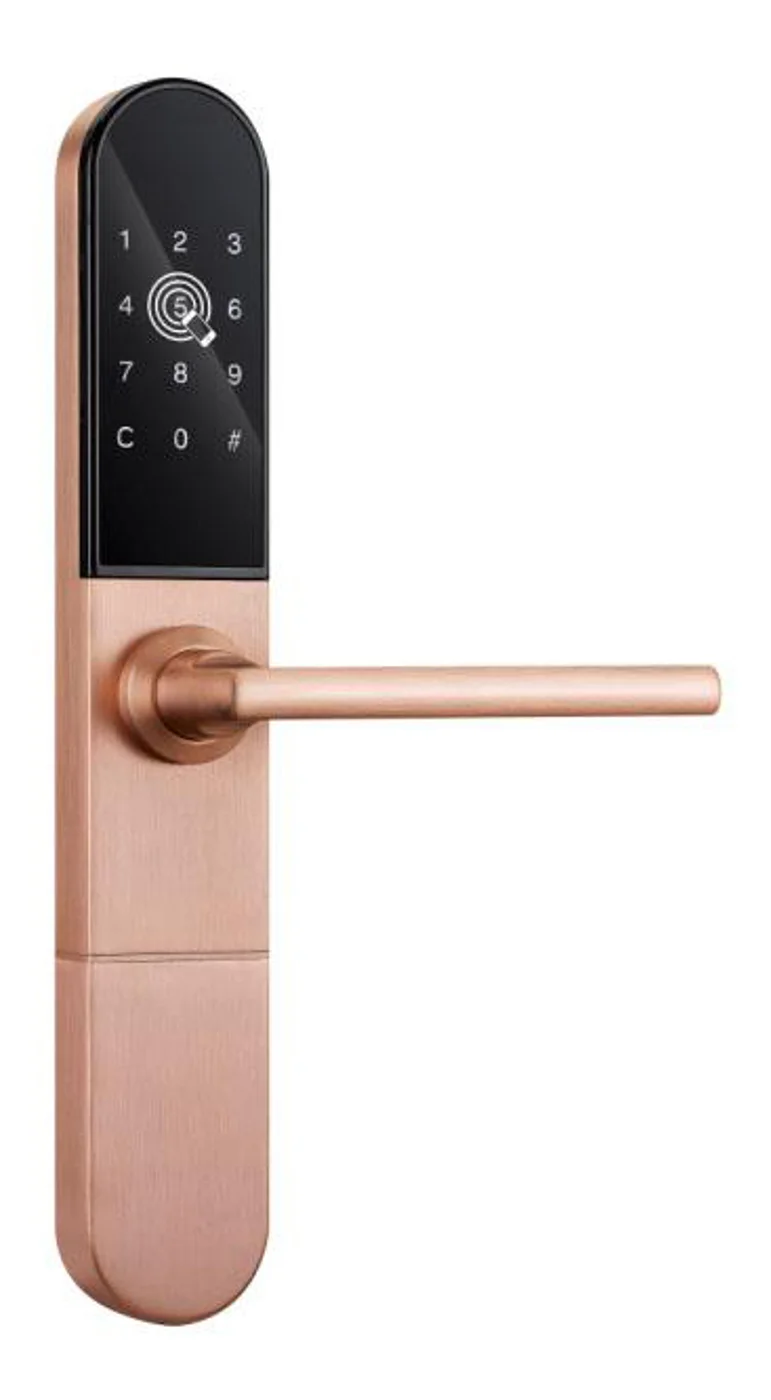
Smart Cabinet Lock — App-Managed, Multi-Site Dashboard
App-managed smart cabinet lock for office, parcel, and multi-site fleets. BLE app dashboard, audit trail, remote unlock, no per-lock server. Higher-tier chassis.
This page already points to it as the next recommended reference.
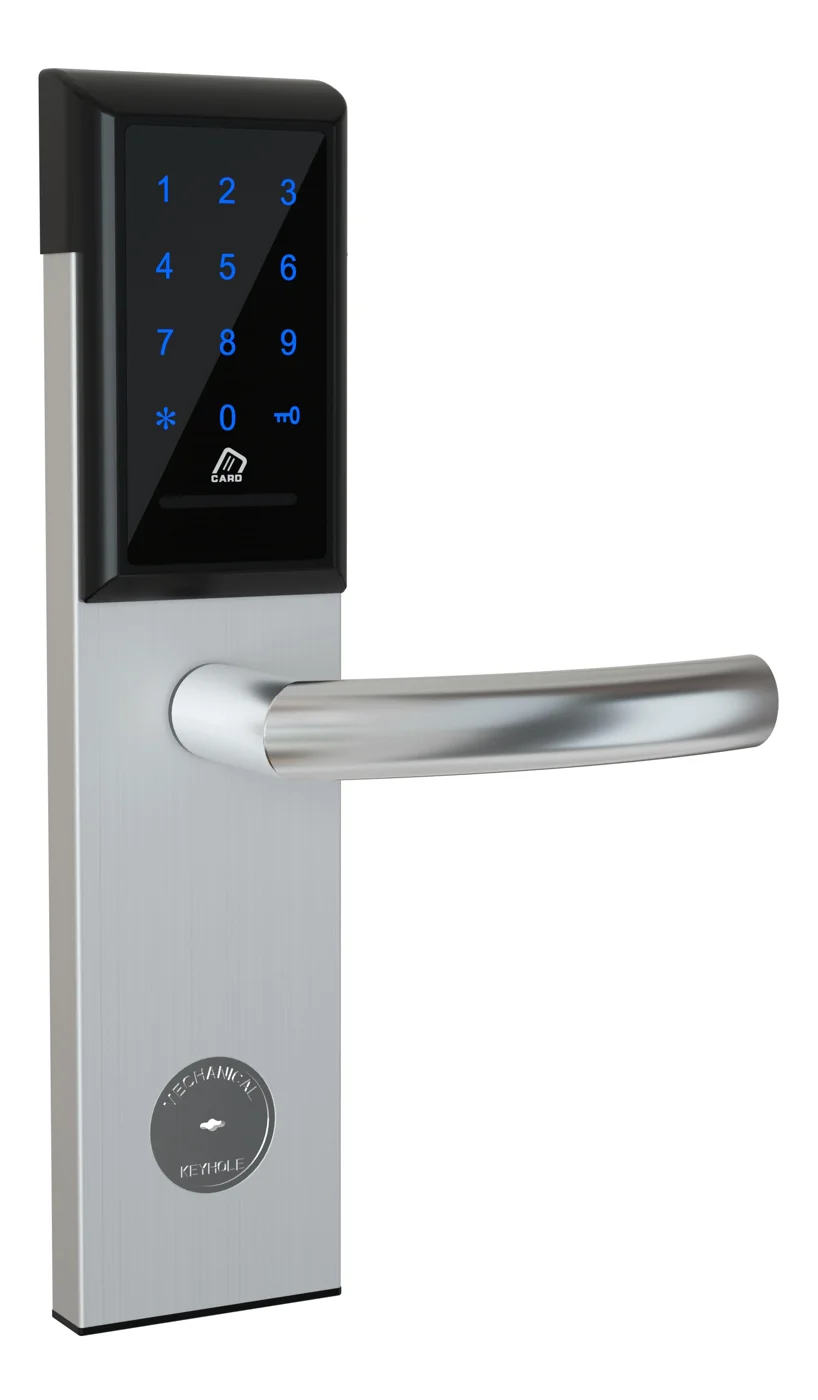
Office Cabinet Lock — PIN + Card for Filing & Pedestals
Offline PIN + card office cabinet lock for filing cabinets, pedestals, and drawers. Battery-powered 5-minute retrofit, no WiFi, no key management. CE/FCC/RoHS.
This page already points to it as the next recommended reference.
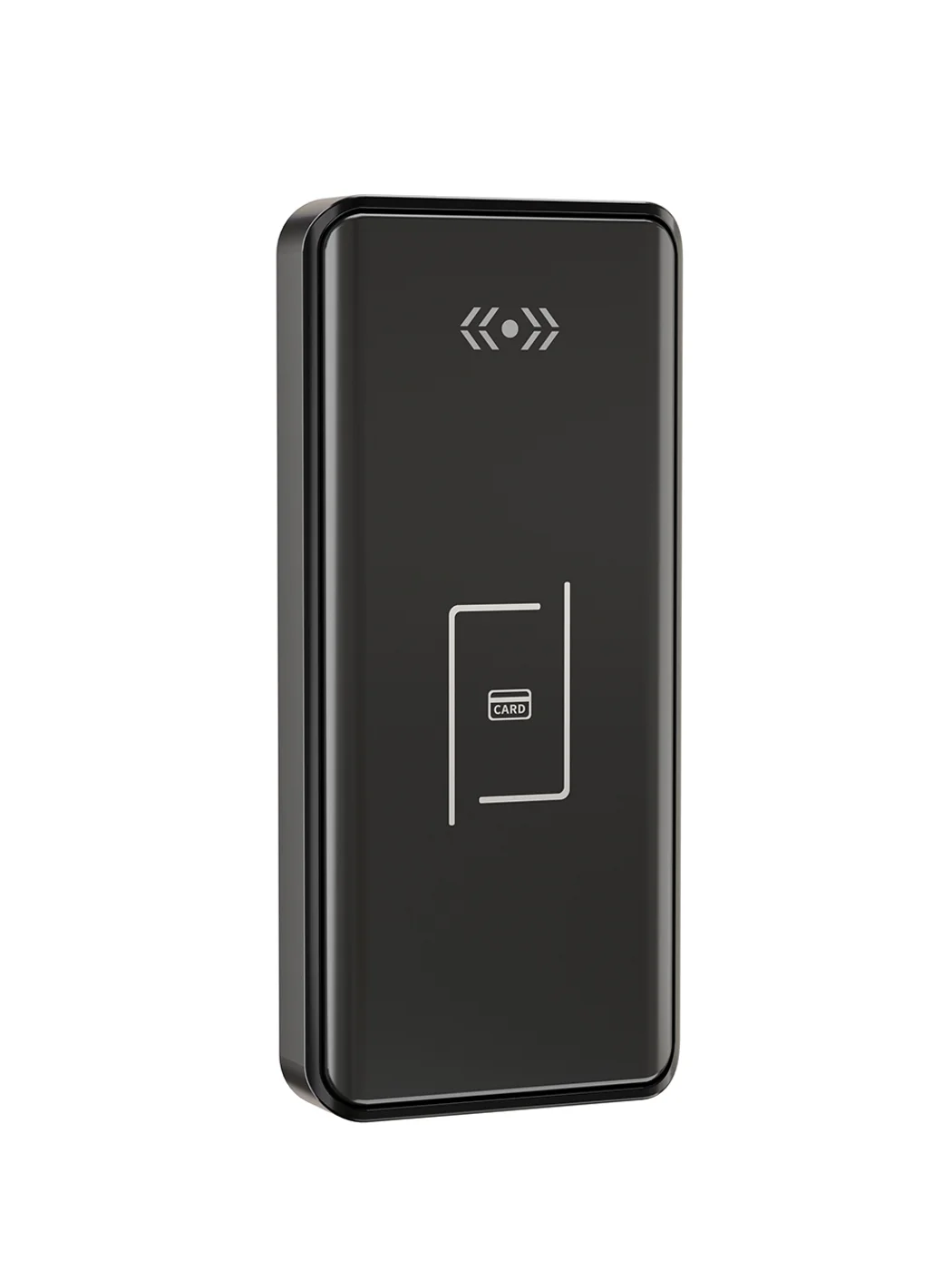
Gym Locker Lock — Offline Card, No WiFi Required
Offline card gym locker lock for fitness and pool lockers. MIFARE card, battery-powered 5-minute retrofit, no WiFi or server. Zinc alloy body, CE/FCC/RoHS.
This page already points to it as the next recommended reference.
Related blog posts
3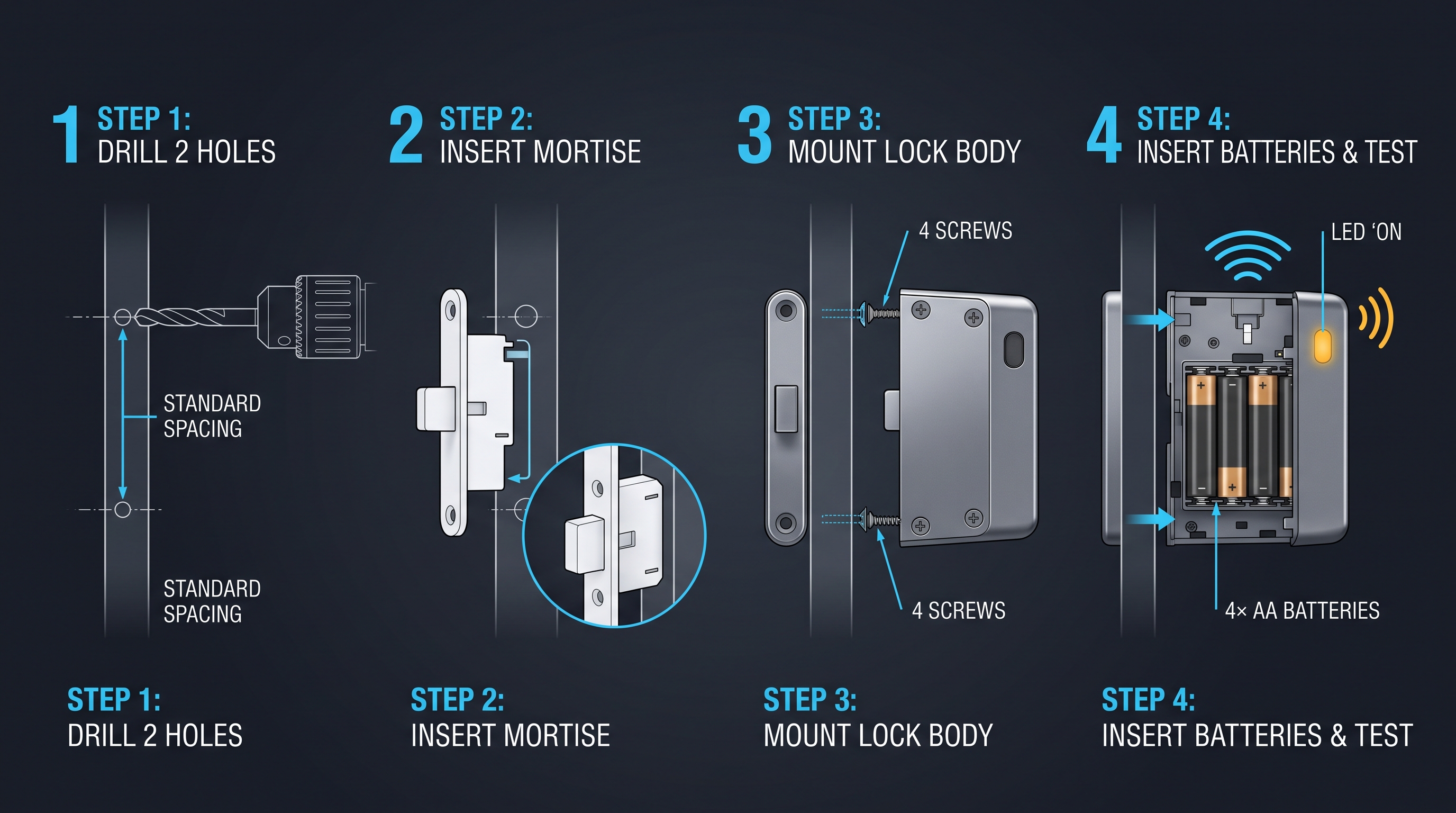
Cabinet Lock Electronic: Complete Technical Guide for 2026 Buyers and Integrators
Comprehensive guide to cabinet lock electronic systems covering types, working principles, installation, pricing, and buying criteria for commercial applications.
It supports the same product context: Smart Cabinet Lock — App-Managed, Multi-Site Dashboard, Office Cabinet Lock — PIN + Card for Filing & Pedestals, Gym Locker Lock — Offline Card, No WiFi Required.
Cabinet Digital Lock: Complete Technical Guide for 2026 Buyers and Integrators
Comprehensive guide to cabinet digital lock systems covering types, working principles, installation, pricing, and buying criteria for commercial and residential applications.
It supports the same product context: Smart Cabinet Lock — App-Managed, Multi-Site Dashboard, Office Cabinet Lock — PIN + Card for Filing & Pedestals, Gym Locker Lock — Offline Card, No WiFi Required.
cabinet latch electronic: The Complete Guide to Electronic Latches for Cabinets, Furniture, and Enclosures
Learn what a cabinet latch electronic is, how solenoid, motor, electromagnetic strike, and push-to-open electronic latches work, plus 12V/24V wiring, fail-secure vs fail-safe, relay and app control, use cases, installation, pricing, and troubleshooting.
It supports the same product context: Smart Cabinet Lock — App-Managed, Multi-Site Dashboard, Office Cabinet Lock — PIN + Card for Filing & Pedestals, Gym Locker Lock — Offline Card, No WiFi Required.
Specify your hotel project with our engineers
Send your room count, ceiling type, and protocol preference. We will return a sample plan and quote within 24 business hours.
- Move from general guidance into a product or application discussion.
- Use RFQ when pricing, drawings, MOQ, or launch timing needs structure.
- Keep a direct contact path visible for fast clarifications and handoff.