Office Cabinet Lock Systems for Modern Workplace Security: The 2026 Comprehensive Guide
A complete guide to office cabinet lock types, security features, access control integration, and installation for commercial workspaces in 2026.
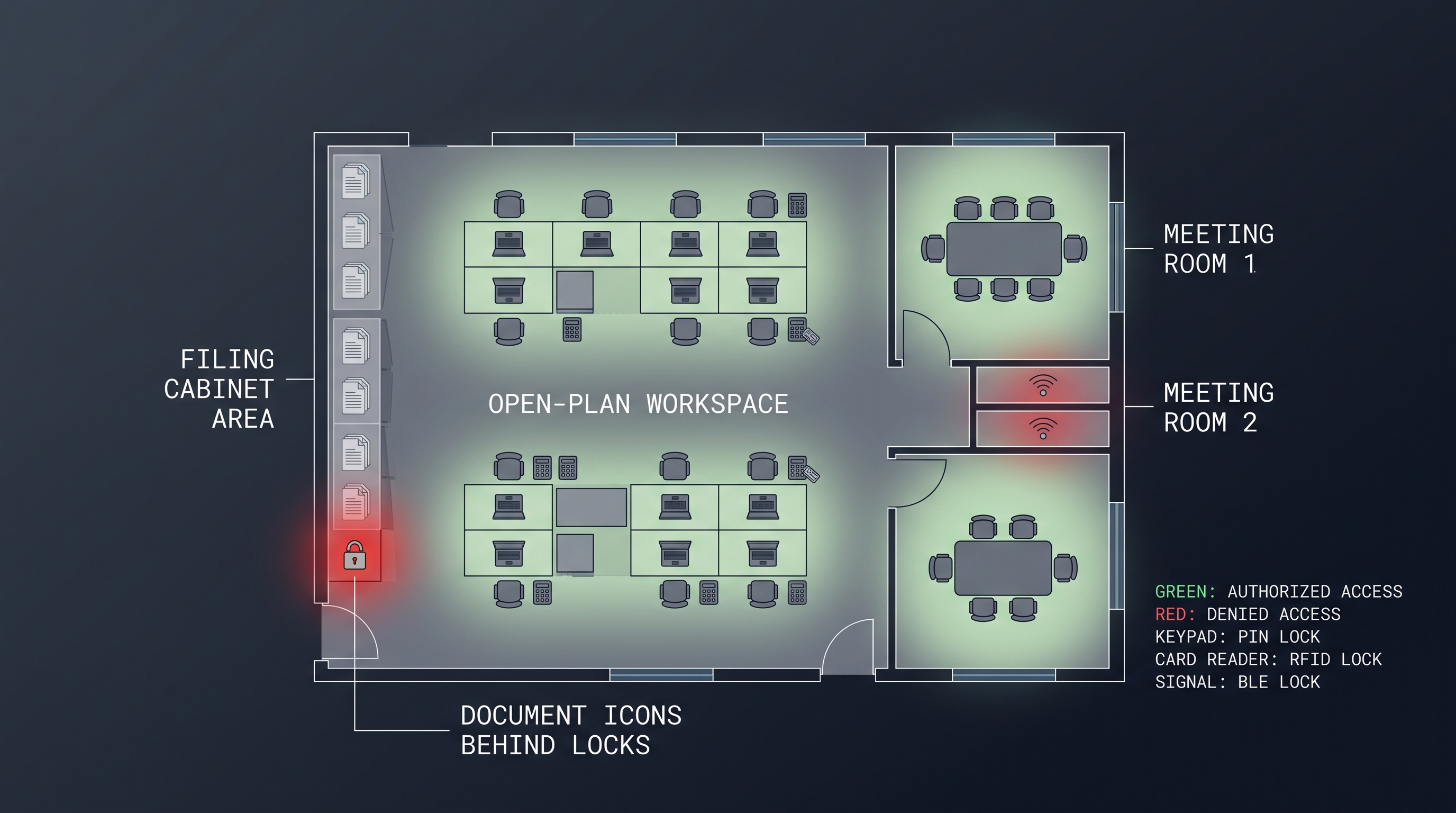
An office cabinet lock is the foundational hardware component that secures filing cabinets, pedestal drawers, credenzas, storage units, and workstation compartments throughout commercial office environments. These locking mechanisms encompass a spectrum from simple keyed cam locks with standard 3/4-inch or 7/8-inch cylinders to advanced electronic systems integrating RFID (125 kHz proximity and 13.56 MHz smart card protocols including HID iCLASS, MIFARE Classic, and MIFARE DESFire EV3), biometric fingerprint recognition with false acceptance rates below 0.001%, and networked smart locks communicating via Bluetooth 5.4 Low Energy, Zigbee 3.0, or Thread mesh protocols. Modern office cabinet lock systems serve dual purposes: physical asset protection for confidential documents, IT equipment, and controlled substances, plus regulatory compliance evidence collection for HIPAA, SOC 2, and ISO 27001 audits. The global commercial furniture lock market exceeded 2.4 billion dollars in 2025, growing at 6.8% annually, driven by hybrid workplace security mandates and hot-desking adoption rates surpassing 72% among Fortune 500 enterprises.
What Is an Office Cabinet Lock: Introduction to Workplace Furniture Security
An office cabinet lock is a purpose-built security mechanism engineered specifically for commercial office furniture, including lateral and vertical filing cabinets, pedestal drawers, overhead storage bins, credenzas, bookcases, and modular workstation components. Unlike residential locks, an office cabinet lock must withstand high-cycle daily operation rated for 25,000 to 100,000 locking cycles, accommodate master key hierarchies across entire corporate floors, and integrate with enterprise identity management systems. The standard office cabinet lock utilizes a 3/4-inch (19mm) or 7/8-inch (22mm) cylinder body with a 5-pin tumbler mechanism, though commercial-grade units upgrade to 6-pin or 7-pin configurations offering 1,000 to 10,000 distinct key combinations. Electronic variants add encrypted credential storage using AES-128 or AES-256, audit trail logging of 4,000 to 30,000 events, and battery life spanning 2 to 5 years on CR2 or CR123A lithium cells. Office cabinet lock selection directly impacts insurance premiums, regulatory compliance posture, and employee productivity in shared and hybrid work environments.
The office cabinet lock has evolved dramatically from its mechanical origins. Early twentieth-century offices relied on simple warded locks and pin tumbler mechanisms manufactured by companies like Corbin Russwin and Sargent & Greenleaf. The postwar corporate boom of the 1950s standardized the cam lock form factor that still dominates today: a cylindrical body inserted through a punched hole in the cabinet door or drawer face, with a rotating cam arm that engages a strike or catch. By the 1980s, office furniture manufacturers such as Steelcase, Herman Miller, and Haworth began specifying proprietary lock footprints to ensure factory-installed compatibility, creating an ecosystem where an office cabinet lock became as much a furniture specification as a security device.
The digital transformation of the workplace has fundamentally redefined what an office cabinet lock must accomplish. Where the legacy office cabinet lock existed purely to keep unauthorized hands out of a drawer, the modern office cabinet lock must also log who accessed what, when, and for how long. This shift reflects three converging forces: the rise of shared and hot-desked workspaces where personal storage must be dynamically assigned, the proliferation of mobile devices and sensitive IT assets stored in office furniture, and the expansion of compliance regimes that now reach physical document storage. An office cabinet lock is no longer a standalone piece of hardware; it is increasingly a node in the enterprise security infrastructure.
How Office Cabinet Locks Work: Mechanical, Electronic, and Networked Mechanisms Explained
An office cabinet lock operates through three principal mechanism families, each with distinct operating principles and integration capabilities. Mechanical office cabinet lock systems rely on pin tumbler or disc tumbler cylinders where a correctly bitted key aligns internal components to a shear line, permitting a cam to rotate 90 to 180 degrees and engage or release the cabinet strike. Electronic office cabinet lock systems replace the keyway with a solenoid or motor-driven deadbolt activated by validated credentials, processing PIN codes through encrypted keypads of 4 to 8 digits, RFID credentials at 125 kHz or 13.56 MHz, or biometric templates stored in local encrypted memory. Networked smart office cabinet lock systems add wireless communication via Bluetooth 5.4 LE at 2.4 GHz, Zigbee 3.0 on 802.15.4, or Thread mesh, enabling real-time credential validation against cloud directories, live audit streaming, and remote lockdown. Lock cycle durability ranges from 25,000 cycles for consumer-grade units to over 100,000 for commercial office cabinet lock hardware.
Mechanical Office Cabinet Lock Operating Principles
The mechanical office cabinet lock relies on precision-engineered pin tumblers. When the correct key enters the cylinder, its bitting lifts each pin pair to the shear line. The driver pins remain in the cylinder housing while the key pins sit flush in the plug, allowing the plug to rotate. This rotation transfers through a tailpiece to the cam, which swings to secure or release the drawer. A quality office cabinet lock in this category uses nickel-silver pins and brass cylinders to resist wear over tens of thousands of cycles. Master keying introduces additional master pins, also called master wafers, that create multiple shear lines, allowing a single master key to operate dozens or hundreds of differently keyed office cabinet lock cylinders while individual user keys open only their assigned units.
The vulnerability profile of the mechanical office cabinet lock warrants careful consideration. Standard 5-pin cylinders can be impressioned or raked by skilled practitioners in under a minute, and key duplication requires no authorization at most hardware retailers. For this reason, offices handling sensitive information often specify restricted keyway sections from manufacturers like Medeco, Schlage Primus, or Assa Abloy CLIQ, where blank availability is contractually controlled and key cutting requires presentation of an authorization card. A restricted-keyway office cabinet lock dramatically reduces the risk of unauthorized duplication, a critical control for compliance frameworks that require demonstrable key management procedures.
Electronic Office Cabinet Lock Mechanisms
The electronic office cabinet lock substitutes electromechanical actuation for mechanical key rotation. Inside the lock body, a low-power solenoid or micro-motor drives a deadbolt or cam. The control circuit validates credentials before energizing the actuator. Credential validation happens at three levels: standalone where the lock's onboard memory checks the presented credential, locally networked where the lock queries a local controller or reader board, or cloud-validated where the lock communicates through a gateway to a cloud identity provider such as Microsoft Entra ID, Okta, or a dedicated access management platform. The standalone office cabinet lock suits smaller deployments; cloud-validated systems suit enterprises requiring centralized policy enforcement and real-time revocation.
Battery power dominates the electronic office cabinet lock category because most office furniture lacks wired power. Typical configurations use 4 AA alkaline cells delivering 1 to 3 years of service, or a single CR2 or CR123A lithium cell delivering 2 to 5 years. Low-battery alerts typically trigger at 20% remaining capacity via LED indicators and, on networked models, cloud notifications. Emergency override options include external battery contact pads where touching a 9V battery to terminals powers the actuator, mechanical override cylinders with a hidden keyway, or portable programmer dongles. The electronic office cabinet lock eliminates the key management burden entirely while adding audit capabilities impossible with mechanical hardware.
Access Control System Integration
Enterprise-grade office cabinet lock systems increasingly integrate with building access control platforms. Integration typically follows one of three architectures. In the reader-first model, a wall-mounted reader from the building's access system using HID iCLASS, Gallagher, LenelS2, or Software House controls a cabinet lock via a Wiegand or OSDP (Open Supervised Device Protocol) interface. In the credential-sharing model, the cabinet lock's onboard reader accepts the same card or fob used at building doors, validating against a shared credential database. In the API-integrated model, the cabinet lock platform exchanges data with the access control system and identity provider through REST APIs or SCIM (System for Cross-domain Identity Management) provisioning events, ensuring that when HR deprovisions a departing employee, their office cabinet lock access vanishes simultaneously with their building door and workstation access.
This integration matters most during employee onboarding and offboarding. A manually managed office cabinet lock program requires facilities staff to physically rekey or reprogram locks whenever personnel change roles or depart. In organizations with annual turnover exceeding 15%, this creates a persistent operational burden and a window of vulnerability between an employee's last day and the rekeying event. Integrated systems collapse that window to seconds, a capability increasingly demanded by auditors reviewing SOC 2 and ISO 27001 access control evidence.
Types of Office Cabinet Locks: Keyed Cam, Electronic Keypad, RFID, Biometric, and Smart Networked Systems
The office cabinet lock market divides into five principal categories, each addressing distinct security tiers, budget constraints, and integration requirements. Mechanical keyed cam locks dominate the installed base at approximately 58% market share due to low cost of 8 to 35 dollars per unit and universal furniture compatibility, utilizing standard 3/4-inch, 7/8-inch, or 1-1/8-inch cylinder bodies with 5-pin or 6-pin tumblers. Electronic keypad locks capture 19% share, offering 4 to 8-digit PIN management with audit trails of 1,000 to 10,000 events and battery life of 1 to 3 years. RFID and NFC locks represent 14% share, reading 125 kHz proximity cards and 13.56 MHz smart credentials including HID iCLASS, MIFARE DESFire EV3, and Seos with read times under 300 milliseconds. Biometric fingerprint locks hold 4% share with false acceptance rates below 0.001%. Smart networked office cabinet lock systems comprise 5% share but grow fastest at 22% annually, adding Bluetooth 5.4, Zigbee 3.0, or Thread wireless connectivity for real-time cloud audit streaming.
Keyed Cam Office Cabinet Lock
The keyed cam office cabinet lock remains the workhorse of office furniture security. Its dominance stems from a combination of low cost, mechanical reliability, zero power requirements, and compatibility with virtually every cabinet design manufactured in the last seventy years. The standard office cabinet lock in this category uses a 5-pin tumbler cylinder in a 3/4-inch body, with a flat cam arm available in straight, offset, or hook configurations to match the cabinet's strike geometry. Cam lengths range from 7/8 inch to 2-1/2 inches to accommodate different door and drawer thicknesses.
For organizations requiring higher security, the keyed cam office cabinet lock upgrades to a 6-pin or 7-pin cylinder with a restricted keyway. Tubular key cam locks offer a middle ground, using a circular key with seven or eight pin positions that resists picking better than standard flat keys. The dimple key office cabinet lock, popularized by European manufacturers, embeds the bitting on the side of the key blade rather than the edge, permitting a more compact cylinder and providing reasonable pick resistance at moderate cost. When specifying a keyed cam office cabinet lock for a new furniture rollout, facilities managers should coordinate keyway standardization across the entire portfolio to enable future master keying and simplify key management.
Electronic Keypad Office Cabinet Lock
The electronic keypad office cabinet lock eliminates the key entirely, replacing it with a numeric code entered on a membrane or capacitive touch keypad. Typical configurations support 1 to 8 user codes of 4 to 8 digits, plus a master or programming code. More advanced models support hundreds of users with individual PINs, time-based access windows allowing cleaning crews access only between 6 AM and 8 AM for example, and audit trail downloads via USB or Bluetooth. The keypad office cabinet lock suits shared workstations and hot-desking environments where physical key handoff is impractical.
Security considerations for the keypad office cabinet lock include code complexity, shoulder-surfing mitigation, and tamper resistance. Four-digit PINs offer only 10,000 combinations, vulnerable to brute force in under an hour on an unprotected lock. Quality office cabinet lock models enforce lockout periods after 3 to 5 failed attempts, ranging from 60 seconds to permanent lockout requiring master reset. Random digit prompting, requiring a random number before the PIN, and virtual keypad shuffling on touchscreen models reduce shoulder-surfing risk. The keypad office cabinet lock typically achieves IP54 or higher ingress ratings for office environments, though it is not suitable for wet or dusty industrial settings.
RFID and NFC Office Cabinet Lock
The RFID office cabinet lock reads proximity credentials at 125 kHz for legacy proximity or 13.56 MHz for modern smart card applications. The 13.56 MHz office cabinet lock supports encrypted mutual authentication protocols including HID iCLASS, MIFARE DESFire EV3, and Seos, which cryptographically verify the credential before granting access and prevent cloning through rolling codes and challenge-response exchanges. Read distance ranges from contact at 0 inches to approximately 1.5 inches, balancing convenience against unintended reads. The NFC office cabinet lock, a subset of the 13.56 MHz category, additionally supports communication with NFC-enabled smartphones, allowing employees to unlock cabinets by tapping their phone, with credentials provisioned and revoked through mobile device management platforms.
The RFID office cabinet lock excels in environments where employees already carry access cards for building entry. By standardizing on a single credential across building doors, elevators, and office furniture, organizations eliminate key fobs, reduce credential management overhead, and gain a unified audit trail. Multi-technology readers that accept both 125 kHz and 13.56 MHz credentials ease migration from legacy systems. For the office cabinet lock specifically, the form factor challenge involves fitting a reader, antenna, controller, battery, and actuator into the slim profile of a drawer front or cabinet door, typically achieving depths of 35 to 55 millimeters.
Biometric Office Cabinet Lock
The biometric office cabinet lock authenticates users through fingerprint, and less commonly, palm vein or facial recognition. Capacitive fingerprint sensors dominate due to their compact size with sensors as small as 10 by 14 millimeters, low power consumption, and resistance to latent print spoofing when paired with liveness detection. The biometric office cabinet lock stores fingerprint templates, not images, in encrypted local memory, supporting 50 to 200 unique users depending on model. False acceptance rates below 0.001% and false rejection rates below 1% deliver security comparable to keyed systems with the convenience of always-on-hand credentials.
The biometric office cabinet lock finds its strongest application in environments requiring non-repudiable access control, including pharmaceutical storage, controlled substance cabinets, executive suites, and any context where PIN sharing or card lending would compromise accountability. Limitations include sensor performance degradation in dirty or oily environments, enrollment overhead for large user populations, and the inability to delegate access since you cannot lend your fingerprint to a colleague for a single task. Privacy considerations also apply, as biometric data collection may trigger GDPR, BIPA (Illinois Biometric Information Privacy Act), or CCPA compliance obligations, requiring explicit consent and data protection safeguards.
Smart Networked Office Cabinet Lock
The smart networked office cabinet lock represents the convergence of physical security and enterprise IT. Building on electronic lock fundamentals, the smart office cabinet lock adds wireless connectivity through Bluetooth 5.4 Low Energy, Zigbee 3.0, Thread, or Wi-Fi that enables real-time communication with a central management platform. This connectivity unlocks capabilities impossible in standalone locks, including live audit streaming, remote access granting and revocation, automated policy enforcement that is time-based, role-based, or location-based, integration with HR systems for automatic provisioning and deprovisioning, and anomaly detection flagging access outside normal hours or unusual patterns.
The smart office cabinet lock typically communicates through a gateway device that bridges the lock's low-power wireless protocol to the corporate IP network. Gateways may manage 50 to 200 locks depending on protocol and building construction. Mesh protocols like Zigbee and Thread self-heal around obstacles and extend range through node-to-node relay. The smart office cabinet lock commands a premium price of 150 to 400 dollars per unit but reduces total cost of ownership through eliminated rekeying costs, reduced facilities staff time, and consolidated audit reporting. For organizations managing more than 200 secured cabinets across multiple sites, the smart office cabinet lock delivers compelling ROI within 18 to 36 months.
Key Features of Office Cabinet Locks: Security, Durability, Compliance, and Integration
An office cabinet lock is evaluated across six critical feature dimensions that determine its suitability for specific workplace applications. Physical security ratings encompass lock body materials including zinc die-cast, stainless steel, or hardened steel, cylinder pick resistance measured by BHMA Grade 1, 2, or 3 certification with Grade 1 surviving 1,000,000 cycles and 10-minute attack tests, and bolt strength resisting 500 to 3,000 pounds of force. Electronic security features encompass credential encryption using AES-128 or AES-256, anti-tamper circuitry with intrusion alarms, and audit trail depth of 1,000 to 30,000 events. Power management specifications include battery type among AA, CR2, and CR123A, expected life of 1 to 5 years, and low-battery thresholds at 20% remaining. Integration capabilities span credential compatibility across 125 kHz, 13.56 MHz MIFARE, HID iCLASS, Seos, and BLE smartphone, protocol support for Wiegand, OSDP, REST API, and SCIM, and platform compatibility with Microsoft Entra ID, Okta, and SALTO KS. Compliance certifications include BHMA/ANSI grades, UL 2050, FIPS 140-3, and ADA per ICC A117.1.
Physical Security and Attack Resistance
The physical security of an office cabinet lock depends on material selection, mechanism complexity, and manufacturing precision. Entry-level office cabinet lock products use zinc die-cast bodies with brass cylinders, adequate for low-security applications like supply cabinets but vulnerable to forceful attack. Mid-tier office cabinet lock hardware upgrades to stainless steel bodies with hardened steel cams, resisting prying and drilling. High-security variants add anti-drill plates using hardened steel inserts in the cylinder face, anti-extract pins preventing the cylinder from being pulled out, and reinforced strike plates on the cabinet side.
BHMA (Builders Hardware Manufacturers Association) certification provides standardized security grading. BHMA Grade 3 office cabinet lock products survive 200,000 cycles and basic attack tests, suitable for light commercial use. Grade 2 raises durability to 400,000 cycles with enhanced attack resistance, appropriate for general office environments. Grade 1, the highest rating, demands 1,000,000 cycles and withstands rigorous attack testing including 10-minute prying, drilling, and twisting assaults. For office cabinet lock applications protecting sensitive documents or high-value assets, Grade 1 or equivalent certification should be the minimum specification.
Audit Trail and Compliance Reporting
The audit trail capability distinguishes electronic and smart office cabinet lock systems from their mechanical predecessors. A comprehensive audit trail records every lock event including user credential, timestamp synchronized to NTP or network time, event type such as unlock, lock, failed attempt, tamper, or low battery, and duration of access. Standalone electronic office cabinet lock models store 1,000 to 10,000 events locally, downloadable via USB or Bluetooth to a management application. Smart networked office cabinet lock systems stream events in real time to cloud platforms, enabling live monitoring, automated alerting, and historical analysis.
For compliance-driven organizations, the audit trail transforms the office cabinet lock from a barrier into an evidence generator. HIPAA Security Rule physical safeguards require documented access controls for facilities containing protected health information; an audited office cabinet lock demonstrates who accessed patient records storage and when. SOC 2 Trust Services Criteria for security and availability require logical and physical access controls with monitoring; the networked office cabinet lock provides the logging evidence auditors expect. ISO 27001 Annex A controls for physical security categories A.11.1 through A.11.2 require entry controls and logging of visitor and access activity; the office cabinet lock audit trail directly supports these controls. The ability to export audit logs in standardized formats including CSV, Syslog, or via API to SIEM platforms determines how seamlessly the office cabinet lock integrates into existing compliance workflows.
Power Management and Battery Life
Battery life dominates the operational economics of electronic and smart office cabinet lock systems. The office cabinet lock draws power only during the brief actuation event, typically 100 to 300 milliseconds for solenoid or motor unlock, so the dominant drain comes from the standby circuit monitoring for credential presentation. Keypad office cabinet lock models in standby consume 10 to 30 microamps, delivering 2 to 3 years on 4 AA alkaline cells. RFID office cabinet lock models poll the antenna more frequently, consuming 50 to 200 microamps and delivering 1 to 2 years on equivalent batteries. Biometric office cabinet lock models with always-on sensors consume more power, typically requiring larger battery packs or more frequent replacement.
Low-battery management prevents lockout scenarios. Quality office cabinet lock products provide multi-stage warnings: LED indication at 30% remaining, audible or networked alerts at 20%, and emergency-only operation disabling convenience features to extend remaining life at 10%. The smart networked office cabinet lock additionally pushes battery status to the management console, enabling preventive maintenance scheduling. Emergency power options include external battery contacts for touching a 9V battery to the lock face to power the actuator for one-time access, mechanical override keyways, and hot-swappable battery packs that maintain lock state during replacement.
Credential Management and User Administration
The credential management model defines how users are enrolled, modified, and removed from the office cabinet lock system. Standalone office cabinet lock models require on-device administration: a master code or programming key adds, changes, or deletes user credentials at each individual lock. This model works for small deployments under 25 locks but becomes unwieldy at scale. Locally networked office cabinet lock systems centralize administration through a door controller or local server, managing 50 to 200 locks from a single interface. Cloud-managed smart office cabinet lock platforms provide the most scalable model, with browser-based administration, role-based access control for facilities managers, and integration with HR systems for automated user lifecycle management.
Time-based access control adds operational flexibility. The office cabinet lock can restrict specific users to defined time windows: business hours for most employees, extended hours for executives, cleaning crew access limited to early morning or evening, and contractor access limited to specific project durations. Role-based access control maps organizational roles to access rights, so promoting an employee to a new position automatically grants access to appropriate cabinets while revoking access to those no longer relevant. The smart office cabinet lock platform automates these changes through API integration with HRIS platforms like Workday, BambooHR, or SAP SuccessFactors.
Office Cabinet Lock Comparison: Traditional vs Electronic vs Smart Systems
An office cabinet lock comparison across traditional, electronic, and smart categories reveals distinct trade-offs in cost, security, manageability, and integration depth. Traditional mechanical office cabinet lock systems cost 8 to 35 dollars per unit, require no power, and offer 25,000 to 100,000 cycle durability, but lack audit trails and necessitate physical rekeying at 40 to 120 dollars per event. Electronic standalone office cabinet lock systems cost 60 to 200 dollars, deliver 1 to 5 year battery life, and provide local audit trails of 1,000 to 10,000 events, supporting 50 to 500 user credentials with PIN, RFID, or biometric authentication. Smart networked office cabinet lock systems cost 150 to 400 dollars, add real-time cloud audit streaming, remote management, and API integration with enterprise identity platforms, reducing per-event access change cost to near zero. Total cost of ownership over a 5-year horizon favors smart systems at deployments exceeding 100 cabinets, where eliminated rekeying costs and reduced administrative labor offset higher acquisition cost.
Office Cabinet Lock Category Comparison Table
The table below presents a detailed comparison of the three primary office cabinet lock categories across the dimensions most relevant to commercial facility and security managers.
| Feature | Traditional Mechanical | Electronic Standalone | Smart Networked |
|---|---|---|---|
| Cost per unit (USD) | 8 to 35 | 60 to 200 | 150 to 400 |
| Power requirement | None | AA or CR2 battery (1 to 5 years) | AA or CR123A battery (1 to 3 years) |
| Lock cycle durability | 25,000 to 100,000 | 50,000 to 100,000 | 50,000 to 100,000 |
| Credential types | Physical key only | PIN, RFID card, fingerprint | PIN, RFID, biometric, smartphone |
| User capacity | 1 key (or master key system) | 50 to 500 users | Unlimited (cloud-managed) |
| Audit trail | None | 1,000 to 10,000 events (local) | Real-time cloud streaming, unlimited |
| Access revocation | Physical rekey (40 to 120 dollars) | On-device deletion | Instant remote revocation |
| Time-based access | Not supported | Supported (basic schedules) | Supported (complex policies) |
| Integration with building ACS | Not supported | Wiegand or OSDP (some models) | Full API, SCIM, REST, cloud sync |
| BHMA grade availability | Grade 1, 2, 3 | Grade 2, 3 | Grade 2, 3 |
| Compliance reporting | Manual key logs | USB or Bluetooth export | Automated SIEM and audit feed |
| Best deployment size | Under 25 cabinets | 25 to 150 cabinets | 150+ cabinets or multi-site |
| 5-year TCO per cabinet (USD) | 200 to 600 | 180 to 350 | 250 to 500 |
Traditional Mechanical Office Cabinet Lock: Strengths and Limitations
The traditional mechanical office cabinet lock offers unmatched simplicity and reliability. With no batteries to replace, no electronics to fail, and no software to update, the mechanical office cabinet lock can operate for decades with minimal maintenance. This longevity makes it the default choice for low-sensitivity applications: general supply cabinets, break room storage, and personal pedestal drawers in assigned-seating offices. The mechanical office cabinet lock also works in environments hostile to electronics including unheated warehouses, areas with high electromagnetic interference, and locations where wireless signals cannot penetrate.
The limitations become apparent at scale. A 500-cabinet office with mechanical office cabinet lock hardware requires a sophisticated key management program encompassing a master key system design, restricted keyway contracts, key issuance logs, lost key procedures, and periodic key audits. Each employee turnover event triggers key recovery and potential rekeying. A lost master key can compromise an entire floor, requiring rekeying of every affected office cabinet lock at substantial cost. The absence of audit trails means that after a security incident, investigators cannot determine who accessed the compromised cabinet. For organizations subject to compliance audits, the mechanical office cabinet lock requires supplementary access control procedures such as sign-in sheets and key checkout logs that are inherently less reliable than automated logging.
Electronic Standalone Office Cabinet Lock: The Middle Ground
The electronic standalone office cabinet lock bridges the gap between mechanical simplicity and smart system sophistication. By eliminating physical keys, it removes the key management burden that plagues mechanical systems. PIN-based office cabinet lock models allow instant code changes when employees depart, with no physical intervention required. RFID office cabinet lock models leverage existing employee badge programs, creating a seamless credential experience from building door to desk drawer. The local audit trail, while requiring manual download, provides compliance evidence that mechanical systems cannot match.
The standalone office cabinet lock trades network connectivity for operational independence. Without dependence on wireless infrastructure, cloud services, or network gateways, the standalone office cabinet lock continues functioning during network outages, internet disruptions, or cloud service incidents. This operational resilience suits organizations with unreliable connectivity or those cautious about cloud dependency. The limitation is management overhead: administering 100 standalone office cabinet lock units requires visiting each lock for user changes, code updates, and audit downloads, a task that consumes hours of facilities staff time per month. Bluetooth-enabled standalone office cabinet lock models mitigate this by allowing smartphone-based administration within range, reducing but not eliminating the management burden.
Smart Networked Office Cabinet Lock: The Enterprise Tier
The smart networked office cabinet lock delivers the full vision of modern physical security: centralized management, real-time monitoring, automated compliance reporting, and seamless integration with enterprise systems. The smart office cabinet lock platform provides a single dashboard view of all secured cabinets across all locations, with live status including locked, unlocked, tampered, and low battery, recent access events, and policy compliance indicators. When an employee departs, HR system integration automatically revokes their access across every office cabinet lock in the organization within seconds, closing the vulnerability window that mechanical systems leave open for days or weeks.
The smart office cabinet lock also enables analytics impossible with standalone systems. Access pattern analysis can identify anomalies including a user accessing cabinets at unusual hours, repeated failed attempts suggesting credential theft, or access patterns inconsistent with the user's role. Integration with building access control and video surveillance creates a correlated security picture: the office cabinet lock event, the badge swipe at the building entrance, and the camera footage of the corridor can be automatically linked for incident investigation. The premium cost of the smart office cabinet lock reflects not just the hardware but the platform capabilities that transform cabinet security from a tactical facility concern into a strategic security asset.
Applications of Office Cabinet Lock Systems Across the Modern Workplace
An office cabinet lock secures diverse applications across the modern workplace, each with distinct security requirements, user populations, and compliance drivers. HR file cabinets storing personnel records, medical benefits enrollment forms, and compensation data represent the highest compliance burden, requiring office cabinet lock systems with audit trails satisfying HIPAA, GDPR, and state privacy regulations. IT equipment storage cabinets housing laptops, tablets, hotspots, and backup drives demand office cabinet lock hardware with asset-tracking integration and rapid checkout for shared device pools. Executive desks require premium office cabinet lock solutions balancing high security with aesthetic integration into high-end furniture. Supply cabinets use cost-effective office cabinet lock products optimized for durability. Shared workstations and hot-desking environments drive demand for smart networked office cabinet lock systems enabling dynamic locker assignment, with 72% of Fortune 500 companies operating hot-desk programs. Healthcare office environments require office cabinet lock systems meeting HIPAA physical safeguards and DEA controlled substance security with biometric authentication and full audit trails.
HR File Cabinets and Personnel Records
HR file cabinets represent the canonical office cabinet lock application. Personnel files contain social security numbers, medical information, salary data, and performance reviews, information subject to GDPR, HIPAA where medical benefits data is involved, and state privacy laws. The office cabinet lock securing HR files must provide more than physical barrier security; it must demonstrate access control to auditors and regulators. Electronic office cabinet lock systems with PIN or RFID credentials and local audit trails meet this requirement for most HR departments. Smart networked office cabinet lock systems add the capability to restrict access to specific HR staff members, log every file access with timestamps, and automatically revoke access when HR employees change roles or depart.
The HR office cabinet lock application also illustrates the importance of emergency access procedures. If the primary cabinet lock fails or the authorized user is unavailable, the organization must still access critical personnel files for legal, audit, or emergency purposes. Quality office cabinet lock systems provide break-glass access: a sealed mechanical override key held by a designated alternate, a remote unlock capability on smart platforms, or a time-limited emergency code generated through a dual-authorization process. These procedures must be documented, tested periodically, and included in the organization's business continuity planning.
IT Equipment Storage and Device Management
IT equipment storage has emerged as a major office cabinet lock application driven by the proliferation of shared device programs. Laptops, tablets, smartphones, hotspots, and accessories stored in office cabinets require secure storage with rapid checkout and return. The office cabinet lock for IT storage must balance security protecting devices worth 500 to 3,000 dollars each with accessibility enabling employees to retrieve and return devices without IT staff intervention. Smart networked office cabinet lock systems excel in this application, integrating with mobile device management platforms to automate device checkout: the employee authenticates at the cabinet, the office cabinet lock releases, and the MDM platform records which device was assigned to whom and for how long.
Asset tracking integration elevates the IT storage office cabinet lock from a barrier to a management tool. By linking cabinet access events to asset management databases, organizations maintain real-time inventory visibility: which devices are in the cabinet, which are checked out, who has them, and when they are due back. Automated alerts flag overdue returns, low battery devices needing charging, and devices due for maintenance or refresh. The office cabinet lock becomes a node in the IT asset lifecycle, providing the physical security layer that enables confident device sharing.
Executive Desks and Private Offices
Executive office furniture demands office cabinet lock solutions that integrate aesthetically with premium materials and designs. Steelcase Series 7, Herman Miller Cosm, and Haworth Collection desks specify office cabinet lock hardware that matches the furniture's finish, proportions, and design language. Premium office cabinet lock products offer finish options including satin chrome, polished brass, oil-rubbed bronze, and matte black to complement furniture aesthetics. Electronic office cabinet lock models designed for executive use often feature capacitive touch surfaces with no visible keypad, activating on approach via proximity sensors and authenticating through smartphone or biometric credential.
Security for executive offices extends beyond the office cabinet lock itself to the overall office security posture. Executive offices often house confidential strategic documents, board materials, and personal items requiring higher security than general office areas. The office cabinet lock in executive applications should integrate with the office's door access control, alarm system, and video surveillance to provide layered security. Smart networked office cabinet lock systems enable executive assistants to manage cabinet access on behalf of executives, granting temporary access to cleaning staff or maintenance personnel with full audit logging.
Supply Cabinets and General Storage
Supply cabinets storing office consumables represent the highest volume but lowest security office cabinet lock application. These cabinets contain items of relatively low individual value such as paper, pens, and toner cartridges but collectively represent significant inventory investment. The office cabinet lock for supply cabinets prioritizes durability and cost-effectiveness over advanced features. Mechanical keyed cam locks dominate this application, with master key systems enabling facilities staff to access all supply cabinets while individual department cabinets use distinct keys. Electronic keypad office cabinet lock models serve supply rooms requiring controlled access to limit supply consumption to authorized personnel, without the cost of RFID or smart systems.
The supply cabinet office cabinet lock also supports inventory management practices. Locking supply cabinets reduce shrinkage and encourage responsible consumption, but excessive restriction creates friction that drives shadow purchasing and employee frustration. The optimal supply cabinet office cabinet lock strategy balances access ensuring employees can obtain needed supplies without excessive delay with control preventing waste, theft, and unauthorized removal. Time-based access on electronic office cabinet lock models enables supply cabinet access during business hours while securing the room after hours, a practical compromise for most office environments.
Shared Workstations and Hot-Desking
The shift to hybrid work and hot-desking has transformed the office cabinet lock market. In assigned-seating offices, each employee has a personal pedestal or locker secured by a mechanical office cabinet lock with a personal key. In hot-desking environments, workstations are shared across employees who reserve spaces dynamically, requiring office cabinet lock systems that support dynamic assignment. Smart networked office cabinet lock systems dominate this application, enabling employees to reserve a workstation and its associated locker through a booking platform, receive a temporary credential via smartphone key or time-limited PIN, use the locker for the reservation period, and have access automatically revoked when the reservation ends.
The hot-desking office cabinet lock must handle high turnover efficiently. A 500-workstation hot-desking office with 80% utilization and 5% daily turnover processes approximately 20 access changes per day, or 5,000 per year. Manual rekeying at 40 to 120 dollars per event would cost 200,000 to 600,000 dollars annually, clearly infeasible. Smart office cabinet lock systems handle this volume at near-zero marginal cost through automated provisioning and revocation, making hot-desking operationally and economically viable. The office cabinet lock, once a static piece of hardware, becomes a dynamic asset management platform that enables the flexible work models employees increasingly expect.
Healthcare Office Environments
Healthcare offices present unique office cabinet lock requirements driven by regulatory compliance and patient safety considerations. Medical records storage must meet HIPAA physical safeguard requirements including access controls, audit logs, and facility security plans. The office cabinet lock securing patient records must log every access with user identification and timestamp, retain logs for the HIPAA-required six-year minimum, and support audit export in formats acceptable to HHS Office for Civil Rights investigators. Pharmaceutical sample cabinets and controlled substance storage add DEA requirements: biometric authentication, dual-authorization access, and tamper-evident seals. The office cabinet lock for controlled substances often requires real-time alerting on access events and integration with pharmacy inventory management systems.
Healthcare office environments also face infection control considerations. The office cabinet lock in clinical areas must withstand disinfection protocols, with surfaces compatible with EPA-registered hospital disinfectants and crevice-free designs that resist contamination. Capacitive touch office cabinet lock models with antimicrobial coatings and hands-free smartphone authentication reduce touchpoints in clinical workflows. The healthcare office cabinet lock must balance these infection control requirements with the durability and audit capabilities required for regulatory compliance, creating a specialized product niche served by manufacturers focusing on healthcare applications.
Installation Guide for Office Cabinet Lock Systems in Commercial Furniture
An office cabinet lock installation process varies significantly across lock types and furniture designs, demanding careful planning for proper function, security, and warranty compliance. Mechanical office cabinet lock installation requires a 3/4-inch (19mm) or 7/8-inch (22mm) mounting hole drilled through the cabinet door or drawer face, with cam length matched to material thickness. Electronic office cabinet lock installation adds a secondary mortise for the battery compartment and control module, requiring 35 to 55 millimeters of interior depth clearance. Smart networked office cabinet lock installation additionally requires gateway placement within 30 to 100 meters for Bluetooth and 50 to 300 meters for Thread, with one gateway per 50 to 200 locks. Furniture manufacturer compatibility must be verified: Steelcase uses a standard 3/4-inch cam lock footprint across Series 2, Series 7, and Migration lines; Herman Miller employs proprietary footprints on Aeron storage requiring compatible office cabinet lock products; Haworth storage generally accepts standard cam locks. Retrofit kits enable converting existing furniture from mechanical to electronic operation.
Pre-Installation Planning and Compatibility Assessment
Before purchasing office cabinet lock hardware, conduct a comprehensive compatibility assessment of the target furniture. Document the cabinet manufacturer, model, construction material whether steel, wood, or laminate, door or drawer thickness, existing lock footprint if retrofitting, and interior clearance dimensions. For Steelcase furniture, consult the Steelcase price list and specification guide to confirm the standard office cabinet lock footprint; most Steelcase lateral files, pedestals, and storage towers use a 3/4-inch cam lock with a standard cam orientation. For Herman Miller products, verify whether the furniture uses the standard Action Office lock, the newer Aeron-compatible footprint, or a proprietary design; Herman Miller's specification guides list compatible office cabinet lock options for each product line. For Haworth furniture, the storage systems generally accept standard cam locks, but verify cam length and offset requirements against Haworth's installation documentation.
For retrofit installations converting mechanical to electronic office cabinet lock systems, measure the existing lock's mounting hole diameter, cylinder length, cam type including straight, offset, or hook, and cam orientation including right, left, top, or bottom. Most electronic retrofit office cabinet lock products are designed to fit standard 3/4-inch cam lock footprints, but cam compatibility varies. Document the number of locks required, their locations, and any special requirements including ADA-compliant mounting heights, fire code egress considerations, or integration with existing access control infrastructure. This assessment informs product selection, budget estimation, and installation scheduling.
Mechanical Office Cabinet Lock Installation
Mechanical office cabinet lock installation follows a straightforward process achievable with basic hand tools. For new furniture without existing lock holes, mark the mounting location on the cabinet door or drawer face, ensuring the cam will engage the strike or catch when rotated. Drill a 3/4-inch or 7/8-inch hole matching the lock cylinder diameter through the panel using a step bit or hole saw. File any burrs and deburr the hole edges. Insert the office cabinet lock cylinder through the hole from the front, position the cam on the back of the cylinder tailpiece, and secure with the provided nut or retaining clip. Test the lock operation with the key, verifying that the cam rotates fully between locked and unlocked positions and properly engages the strike.
For retrofitting existing furniture, remove the old office cabinet lock by loosening the retaining nut or clip and withdrawing the cylinder. Clean the mounting hole and inspect for wear or deformation. If the existing hole matches the new lock's diameter, install the new office cabinet lock directly. If the hole is oversized, which is common when replacing worn locks, use a spacer bushing or escutcheon plate to ensure a snug fit. After installation, test all keys in the new lock, distribute keys according to the key management plan, and update key inventory records. For master key systems, verify that both change keys and master keys operate all assigned office cabinet lock cylinders correctly.
Electronic Office Cabinet Lock Installation
Electronic office cabinet lock installation requires additional steps for power management and electronic component placement. After mechanically mounting the lock body following the same hole preparation as mechanical locks, route the wiring harness from the lock cylinder to the battery compartment and control module. The control module typically mounts inside the cabinet, requiring a flat surface with sufficient clearance of approximately 50 by 80 millimeters for standard modules. Secure the module using double-sided adhesive pads included with most electronic office cabinet lock kits or mechanical fasteners for permanent installation. Connect the wiring harness, ensuring polarity correctness and strain relief to prevent disconnection during drawer operation.
After mechanical and electrical installation, program the office cabinet lock according to the manufacturer's instructions. This typically involves initializing the lock, setting the master or programming code, enrolling user credentials including PINs, RFID cards, or fingerprints, and configuring access schedules if supported. Test all enrolled credentials, verifying that authorized users can unlock the cabinet and unauthorized credentials are rejected. For RFID office cabinet lock models, test credential reading distance and angle to ensure reliable operation. Document the installed lock's location, serial number, enrolled users, and master code in a secure configuration register. For standalone electronic office cabinet lock deployments exceeding 25 units, consider a management application that tracks lock configurations and credential assignments across the fleet.
Smart Networked Office Cabinet Lock Installation
Smart networked office cabinet lock installation adds wireless infrastructure provisioning to the electronic installation process. Before installing locks, conduct a wireless site survey to determine gateway placement. Gateways should be positioned to cover the maximum number of office cabinet lock units with reliable signal strength, considering building construction materials since concrete and steel reduce range significantly compared to drywall and wood partitions. Install gateways on the corporate network, verifying IP address assignment, firewall rules, and cloud connectivity. Most smart office cabinet lock platforms provide a network readiness checklist specifying required ports, protocols, and endpoints.
After gateway installation, mount and wire each smart office cabinet lock following the electronic installation procedure, then enroll each lock in the management platform. Enrollment typically involves scanning a QR code or entering a serial number on the management console, which discovers the lock through the nearest gateway and provisions cryptographic credentials for secure communication. Assign each office cabinet lock to a location hierarchy covering building, floor, room, and cabinet, and configure access policies. For multi-site deployments, verify that locks at each location communicate with the appropriate regional gateway and that the management console displays all locations correctly. Conduct a failover test by disconnecting a gateway and verifying that locks continue operating in offline mode with credential validation from local memory, and that events are uploaded when connectivity restores.
ADA Compliance and Accessibility Considerations
The office cabinet lock must comply with accessibility standards including the Americans with Disabilities Act (ADA) and ICC A117.1 for Accessible and Usable Buildings and Facilities. Key requirements affect mounting height and operating force. ADA Section 308 specifies that operable parts must be reachable: forward reach between 15 and 48 inches above the floor, side reach between 15 and 48 inches. For office cabinet lock hardware on pedestals and lower drawers, this typically requires the lock cylinder or keypad at a height accessible from a seated position. For overhead cabinets and upper storage, the office cabinet lock must not exceed the 48-inch maximum reach height, which may limit cabinet mounting height or require pull-down mechanisms.
Operating force requirements specify that the office cabinet lock must be operable with one hand without tight grasping, pinching, or twisting of the wrist, with a maximum operating force of 5 pounds for hardware. Lever-style cam locks, large-diameter keypad buttons, and touchless RFID or smartphone authentication accommodate these requirements. Electronic office cabinet lock models with capacitive touch keypads and voice guidance enhance accessibility for visually impaired users. When specifying office cabinet lock hardware for accessible workstations, verify compliance with ADA and ICC A117.1 requirements and document the compliance in facility records for audit purposes.
Fire Code and Egress Considerations
Office cabinet lock installations must consider fire code requirements, particularly for cabinets in egress paths or containing hazardous materials. The International Fire Code (IFC) and local fire codes regulate storage in means of egress, limiting obstructions and ensuring that exit paths remain clear. Office cabinet lock hardware on cabinets in egress corridors must not project into the required exit width. Cabinets storing flammable or combustible materials require office cabinet lock hardware compatible with fire-rated cabinet construction and may require specific lock types such as self-latching or fail-safe designs that unlock automatically during fire alarm activation.
Fail-safe versus fail-secure operation is a critical office cabinet lock specification for life safety. Fail-safe office cabinet lock hardware unlocks automatically upon power loss or fire alarm activation, ensuring that occupants can access emergency equipment or exit through secured areas. Fail-secure office cabinet lock hardware remains locked upon power loss, maintaining security for sensitive contents during outages. For office cabinet lock applications in or near egress paths, fail-safe operation is typically required. For office cabinet lock applications protecting sensitive documents or assets, fail-secure operation may be preferred, provided that life safety is not compromised. Consult with the local Authority Having Jurisdiction (AHJ) and fire protection engineer to determine the appropriate office cabinet lock operation mode for each application.
Pricing and Buying Guide for Office Cabinet Lock Systems
An office cabinet lock market spans from 8 dollars for basic mechanical cam locks to 400 dollars for enterprise smart networked systems, with costs influenced by lock type, quantity, and integration. Mechanical office cabinet lock products cost 8 to 35 dollars per unit, with restricted keyway variants from Medeco and Schlage Primus reaching 45 to 90 dollars. Electronic keypad office cabinet lock models range from 60 to 150 dollars, RFID office cabinet lock products from 90 to 250 dollars, and biometric office cabinet lock systems from 150 to 350 dollars. Smart networked office cabinet lock hardware costs 150 to 400 dollars per unit, with subscription fees of 2 to 8 dollars per lock per month. Installation labor adds 25 to 75 dollars per lock for mechanical, 50 to 120 dollars for electronic, and 75 to 150 dollars for smart systems. Retrofit kits for converting to electronic office cabinet lock operation cost 80 to 200 dollars per unit. Volume discounts of 10 to 25% apply above 50 units.
Office Cabinet Lock Pricing by Type and Tier
The office cabinet lock pricing table below provides detailed cost ranges across lock types and quality tiers, supporting budget development and product selection.
| Lock Type | Entry-Level (USD) | Mid-Tier (USD) | Premium (USD) | Volume Discount Threshold |
|---|---|---|---|---|
| Mechanical cam lock (standard) | 8 to 15 | 15 to 25 | 25 to 35 | 100 units |
| Mechanical cam lock (restricted keyway) | 45 to 60 | 60 to 75 | 75 to 90 | 50 units |
| Electronic keypad lock | 60 to 90 | 90 to 120 | 120 to 150 | 25 units |
| RFID lock (125 kHz) | 90 to 130 | 130 to 180 | 180 to 250 | 25 units |
| RFID lock (13.56 MHz, encrypted) | 120 to 170 | 170 to 220 | 220 to 300 | 25 units |
| Biometric fingerprint lock | 150 to 200 | 200 to 275 | 275 to 350 | 15 units |
| Smart networked lock | 150 to 220 | 220 to 300 | 300 to 400 | 50 units |
| Smart platform subscription | 2 to 4 per lock/month | 4 to 6 per lock/month | 6 to 8 per lock/month | 100 locks |
Total Cost of Ownership Analysis
The acquisition price of the office cabinet lock represents only 30 to 50% of the total cost of ownership over a five-year horizon. Operational costs include battery replacement at 2 to 10 dollars per lock per year for electronic models, key management labor estimated at 15 to 45 minutes per lock per year for mechanical systems, audit log collection at 1 to 5 minutes per lock per month for standalone electronic, and rekeying or reprogramming at 40 to 120 dollars per event for mechanical and near zero for smart systems. The office cabinet lock TCO analysis must also consider the cost of security incidents: a single unauthorized access event compromising confidential information can cost 50,000 to 500,000 dollars in investigation, notification, and remediation, dwarfing the cost difference between lock tiers.
For organizations with more than 100 secured cabinets, the smart networked office cabinet lock typically delivers the lowest five-year TCO despite the highest acquisition cost. The elimination of rekeying costs estimated at 3 to 8 events per cabinet over five years at 40 to 120 dollars each, reduction in facilities staff time for access management, and automated compliance reporting that reduces audit preparation labor collectively offset the premium hardware and subscription costs. For smaller deployments under 50 cabinets, standalone electronic office cabinet lock systems often provide the best TCO balance, delivering audit trails and keyless convenience without the infrastructure overhead of smart systems. For very small deployments under 25 cabinets or low-security applications, mechanical office cabinet lock hardware remains economically optimal.
Vendor Selection and Procurement Criteria
Selecting an office cabinet lock vendor requires evaluation beyond price to include product reliability, support quality, integration capabilities, and long-term platform viability. Key vendor evaluation criteria include product warranty ranging from 1 to 5 years typical with lifetime warranties on some mechanical office cabinet lock products, technical support availability covering business hours versus 24/7 and phone versus email versus chat, firmware update commitment regarding how long the vendor supports lock firmware with security patches, platform roadmap transparency including published feature roadmap and end-of-life policies, and integration ecosystem covering pre-built connectors for common access control, identity, and HRIS platforms. Request references from comparable deployments and conduct site visits if possible.
Procurement should also consider the vendor's financial stability and corporate ownership. The office cabinet lock market has experienced consolidation, with smaller manufacturers acquired by larger security conglomerates. While acquisition can bring improved resources and integration, it can also lead to product discontinuation or platform migration. For smart networked office cabinet lock systems where the management platform is critical, evaluate the vendor's cloud infrastructure including data center locations, uptime SLA, and data residency options for GDPR compliance, data security posture including SOC 2 Type II certification and encryption at rest and in transit, and data portability regarding the ability to export all data if migrating to a different platform. Negotiate contract terms including data ownership, service level agreements, and termination provisions that protect the organization's investment if the vendor relationship ends.
Furniture Manufacturer Compatibility and OEM Specifications
When purchasing office cabinet lock hardware for specific furniture lines, verify compatibility with the furniture manufacturer's specifications. Steelcase publishes office cabinet lock compatibility information in product price lists and specification guides, identifying standard and optional lock configurations for each storage product. Steelcase storage products including Series 2, Series 7, Migration, and Storage Works lines generally accept standard 3/4-inch cam lock office cabinet lock hardware, with OEM electronic lock options available on select models. Herman Miller product specifications identify compatible office cabinet lock options for Action Office, Aeron storage, and other lines; some Herman Miller products use proprietary lock footprints requiring OEM or specifically licensed third-party office cabinet lock hardware. Haworth storage products including Planes, Limes, and Storage Walls lines generally accept standard cam locks with documented cam specifications.
For retrofit projects upgrading existing furniture from mechanical to electronic office cabinet lock operation, confirm that the retrofit kit fits the existing lock footprint without requiring cabinet modification. Most electronic retrofit office cabinet lock products are designed for standard 3/4-inch cam lock footprints, but cam length, offset, and orientation must match the existing installation. Some furniture manufacturers offer factory retrofit programs or certified installer networks for electronic office cabinet lock upgrades. For mixed-vendor furniture fleets, standardize on office cabinet lock products compatible with the majority of furniture, using adapter plates or custom cams for non-standard installations. Document all compatibility decisions in the facility specification register for future reference and warranty management.
Troubleshooting Office Cabinet Lock Issues: Common Problems and Solutions
An office cabinet lock, whether mechanical, electronic, or smart networked, encounters operational issues that facilities and IT teams must diagnose and resolve efficiently. Mechanical office cabinet lock failures manifest as key difficulty caused by worn pins, debris accumulation, misaligned strikes, or bent cams. Electronic office cabinet lock issues include battery failures accounting for 60 to 70% of service calls, credential recognition failures from RFID antenna obstruction or biometric sensor contamination, and actuator malfunctions involving solenoid or motor failure. Smart networked office cabinet lock issues add connectivity problems including gateway out of range, network outages, or cloud service disruption, and synchronization failures where credential updates do not propagate. Common across all office cabinet lock types are installation errors including misaligned strikes, insufficient cam engagement, and overtightened mounting hardware. The troubleshooting procedures below address the most frequent office cabinet lock issues with diagnostic steps and resolution guidance.
Mechanical Office Cabinet Lock Troubleshooting
When a mechanical office cabinet lock becomes difficult to operate, the diagnostic process begins with identifying the symptom category. Key insertion difficulty, characterized by resistance when inserting or removing the key, typically indicates debris in the keyway, worn or damaged pins, or a bent key. Clean the keyway with compressed air or a keyway brush, inspect the key for damage, and lubricate the cylinder with graphite powder or PTFE-based lock lubricant. Never use oil-based lubricants, which attract debris and accelerate wear. If the problem persists, the cylinder may require rekeying or replacement. Key rotation difficulty, where the key binds when turned, suggests misalignment between the cam and strike, a bent cam, or internal cylinder damage. Inspect the cam for straightness and proper engagement with the strike, adjust the cam position or replace bent components, and verify that the cabinet door or drawer operates smoothly without binding.
A mechanical office cabinet lock that fails to lock or unlock, where the key turns but the cabinet remains in the same state, indicates cam disconnection or breakage. Remove the lock and inspect the cam attachment to the cylinder tailpiece. If the cam is loose, tighten the retaining screw or nut. If the cam is broken or worn, replace it with a compatible cam of the same type, length, and offset. An office cabinet lock that opens with any key or no key indicates a severely worn or damaged cylinder requiring immediate replacement. For master key systems, if a change key fails to operate its assigned lock but the master key works, the master pins may be worn or installed incorrectly, requiring cylinder service by a qualified locksmith.
Electronic Office Cabinet Lock Troubleshooting
Electronic office cabinet lock issues most commonly stem from battery depletion. When an electronic office cabinet lock fails to respond to credential input, showing no LED indication and no actuator sound, the battery is likely depleted. Use the emergency power option, including external 9V battery contacts, mechanical override key, or portable programmer, to gain access, then replace the internal batteries. To prevent lockout, establish a preventive battery replacement schedule based on the lock's expected battery life, replacing at 75% of rated life to provide margin. For smart networked office cabinet lock systems, configure low-battery alerts at 30% remaining capacity to enable scheduled replacement before critical depletion.
Credential recognition failures on electronic office cabinet lock systems have multiple causes. RFID office cabinet lock models may fail to read cards due to antenna obstruction from metallic objects near the reader, card damage or demagnetization, or incorrect card format enrollment. Test with a known-good card, clear the reader area of metallic objects, and verify that the enrolled card format matches the presented credential. Biometric office cabinet lock models may fail to recognize fingerprints due to sensor contamination from oil, dirt, or moisture, finger condition such as dry, wet, or injured, or template degradation. Clean the sensor with a lint-free cloth, try an alternate enrolled finger, and re-enroll fingerprints if recognition rates remain poor. Keypad office cabinet lock models may fail to accept PINs due to membrane damage causing non-responsive buttons, moisture ingress, or electronic malfunction. Test each button for tactile and audible response, and replace the keypad module if buttons are non-functional.
Smart Networked Office Cabinet Lock Troubleshooting
Smart networked office cabinet lock issues often involve connectivity rather than the lock hardware itself. If a smart office cabinet lock appears offline in the management console, first verify that the lock has battery power by checking LED indicators or using the physical credential as fallback. If the lock is powered, verify gateway connectivity: check that the gateway has power, network connectivity with an active Ethernet or Wi-Fi link, and cloud connectivity by verifying the gateway can reach the cloud endpoint through firewalls. If the gateway is operational, check wireless signal strength between the lock and gateway: metal cabinets, concrete walls, and distance beyond the protocol's effective range can cause communication failures. Reposition the gateway, add a repeater for mesh protocols, or install an additional gateway to improve coverage.
Credential synchronization failures occur when user access changes made in the management platform do not propagate to the office cabinet lock. This typically indicates a communication failure between the cloud platform and the lock, or a lock that has exceeded its offline credential cache capacity. Force a synchronization by bringing the lock online through moving it within gateway range or addressing the connectivity issue, then verify that the credential update appears in the lock's local audit trail. If synchronization continues to fail, check the lock's firmware version and update if necessary, as synchronization bugs are often resolved in firmware patches. For persistent issues, contact the platform vendor's technical support with the lock's serial number, the affected user credentials, and the audit trail showing the synchronization failure.
Preventive Maintenance and Lifecycle Management
Preventive maintenance extends office cabinet lock life and reduces service calls. For mechanical office cabinet lock hardware, annual maintenance includes cleaning keyways, lubricating cylinders with graphite or PTFE lubricant, inspecting cams and strikes for wear, and verifying smooth operation. For electronic and smart office cabinet lock systems, preventive maintenance includes battery replacement on a scheduled cycle, sensor cleaning for keypad membranes, RFID reader surfaces, and biometric sensors, firmware updates as released by the manufacturer, and audit log collection and archival. Establish a maintenance calendar tracking each office cabinet lock's service history, battery replacement dates, and firmware version.
Office cabinet lock lifecycle management planning should anticipate end-of-life replacement. Mechanical office cabinet lock hardware typically lasts 15 to 25 years with proper maintenance, though high-use locks may require cylinder replacement at 7 to 10 years. Electronic office cabinet lock systems have shorter lifespans of 7 to 12 years due to battery cycle degradation, electronic component aging, and technology obsolescence. Smart networked office cabinet lock systems may require replacement or upgrade at 5 to 8 years as wireless protocols evolve, security standards advance, and platform support phases out older hardware. Budget for lifecycle replacement by reserving 5 to 10% of the office cabinet lock fleet's replacement value annually, ensuring funds are available when locks reach end of life.
Future Trends in Office Cabinet Lock Technology: AI, IoT, and Workplace Evolution
An office cabinet lock market enters a period of rapid innovation driven by artificial intelligence, IoT maturation, biometric advancement, and hybrid workplace evolution. AI-enhanced office cabinet lock systems will deliver behavioral analytics detecting anomalous access patterns in real time, with machine learning models flagging deviations indicating credential theft or insider threats. IoT protocol convergence will standardize office cabinet lock communication on Matter and Thread, enabling interoperability across building automation ecosystems. Biometric office cabinet lock technology will expand beyond fingerprints to include palm vein recognition and facial recognition for continuous authentication. The hybrid workplace trend drives demand for dynamic locker management office cabinet lock systems integrated with workspace booking platforms, with the market projected to exceed 4.2 billion dollars by 2030 growing at 14.3% CAGR. Sustainability will see manufacturers adopt recyclable materials, replaceable battery modules, and energy harvesting technologies. Post-quantum cryptography preparation will influence office cabinet lock security architecture, with manufacturers evaluating quantum-resistant algorithms for credential encryption.
Artificial Intelligence and Behavioral Analytics
The integration of artificial intelligence into office cabinet lock systems represents the most transformative trend in physical security. AI-enhanced office cabinet lock platforms analyze access patterns across the entire lock fleet, establishing baseline behavior for each user and location. Machine learning models detect anomalies that traditional rule-based systems miss: an employee accessing cabinets they rarely use, access at unusual hours, rapid sequential access to multiple cabinets suggesting credential sharing or theft, and access patterns correlating with other security events in the building. The smart office cabinet lock becomes not just a barrier but an intelligent sensor contributing to the organization's overall security posture.
Predictive analytics extends AI value beyond anomaly detection to preventive maintenance. By analyzing office cabinet lock operational data including actuation times, battery drain rates, and credential recognition latency, AI models can predict lock failures before they occur, enabling scheduled maintenance that prevents lockout incidents. For large deployments, this predictive capability reduces service calls, extends lock life through timely intervention, and improves user satisfaction by eliminating unexpected lock failures. The AI-enabled office cabinet lock platform also automates compliance reporting, generating audit-ready documentation that maps access events to regulatory requirements without manual correlation.
IoT Protocol Convergence and Interoperability
The office cabinet lock market has suffered from protocol fragmentation, with manufacturers employing proprietary wireless protocols that limit interoperability and create vendor lock-in. The emergence of Matter and Thread as unified IoT standards promises to transform the smart office cabinet lock landscape. Matter provides a unified application layer enabling devices from different manufacturers to interoperate, while Thread offers a robust, self-healing mesh networking protocol ideal for the dense deployment patterns of office cabinet lock fleets. As Matter-native office cabinet lock products reach the market, organizations will gain the freedom to mix and match lock hardware from different vendors within a unified management platform.
Protocol convergence also enables deeper integration with building automation ecosystems. The smart office cabinet lock can participate in building-wide automation scenarios: when the building management system transitions to unoccupied mode after hours, office cabinet lock systems automatically verify all cabinets are locked and alert security if any are left unsecured. When a fire alarm activates, fail-safe office cabinet lock hardware releases to support evacuation, while the management platform logs the event for post-incident analysis. Integration with lighting, HVAC, and occupancy sensing creates a cohesive smart building environment where the office cabinet lock contributes to and benefits from building-wide intelligence.
Advanced Biometrics and Continuous Authentication
Biometric office cabinet lock technology will advance beyond fingerprint recognition to encompass multiple modalities. Palm vein recognition, already deployed in high-security applications, offers contactless authentication ideal for healthcare and food service environments where fingerprint sensors present contamination concerns. Palm vein patterns are internal to the hand, resistant to spoofing, and readable at distances of 5 to 10 centimeters, enabling a hygienic and secure office cabinet lock authentication experience. Facial recognition office cabinet lock systems, leveraging infrared depth sensing for liveness detection, can authenticate users as they approach the cabinet without explicit interaction, creating a seamless experience while maintaining security.
Continuous authentication represents a more fundamental shift in the office cabinet lock security model. Rather than authenticating once at the moment of access, continuous authentication systems monitor the user's presence throughout the access session, using behavioral biometrics including gait analysis as the user approaches, typing patterns if a keypad is used, and proximity of a registered smartphone to verify that the authenticated user remains present. If the user departs and an unauthorized person attempts to access the open cabinet, the system can trigger an alert or automatically re-secure the cabinet. This capability addresses the common security gap where a user authenticates, opens the cabinet, and walks away, leaving the contents accessible to anyone in the vicinity.
Hybrid Workplace and Dynamic Locker Management
The hybrid workplace trend, accelerated by the post-pandemic shift to flexible work arrangements, will continue driving demand for dynamic locker management office cabinet lock systems. As organizations reduce dedicated desk assignments in favor of shared workspaces, the office cabinet lock becomes a critical enabler of the flexible office model. Employees reserve lockers through mobile apps, receive digital credentials, use the locker for their reservation period, and have access automatically revoked at checkout. The smart office cabinet lock platform manages this dynamic assignment at scale, handling hundreds or thousands of daily reservation changes without human intervention.
Future dynamic locker systems will incorporate richer integration with workplace experience platforms. The office cabinet lock reservation system will sync with desk booking, meeting room booking, and parking reservation systems to provide a unified workplace experience. Employees arriving at the office will find their reserved desk, locker, and parking space ready, with access credentials pushed to their smartphone before arrival. Analytics from office cabinet lock usage will inform workplace design, identifying peak usage times, underutilized locker banks, and optimal locker-to-employee ratios. The office cabinet lock, once a static security device, becomes a dynamic contributor to workplace experience and space optimization.
Sustainability and Environmental Responsibility
Environmental sustainability will increasingly influence office cabinet lock design and procurement. Manufacturers are adopting recyclable materials including aluminum, steel, and engineering plastics with recycled content, designing for disassembly to enable component recycling at end of life, and reducing packaging waste. Battery management represents the most significant sustainability challenge for electronic and smart office cabinet lock systems; millions of discarded batteries from office furniture locks contribute to environmental burden. Replaceable battery modules with recycled content, rechargeable options enabling solar or kinetic energy harvesting, and battery recycling programs address this challenge.
Energy harvesting technologies offer the potential for battery-free office cabinet lock operation. Solar cells integrated into cabinet surfaces can power low-consumption locks in well-lit office environments. Kinetic energy harvested from drawer opening and closing motions can charge capacitors that power the lock actuator. While these technologies remain in early development for office cabinet lock applications, they represent a path toward sustainable, maintenance-free operation. Sustainability-focused organizations should evaluate office cabinet lock products not only on security and functionality but on environmental impact, favoring manufacturers with published sustainability commitments, recyclable product design, and take-back programs for end-of-life hardware.
Post-Quantum Cryptography Preparation
The looming threat of quantum computing to current cryptographic standards will eventually influence office cabinet lock security architecture. RSA and ECC cryptography, which protect credential storage and communication in current smart office cabinet lock systems, are vulnerable to quantum computing attacks that could emerge within the next 10 to 15 years. While a quantum computer capable of breaking current cryptography does not yet exist, forward-thinking office cabinet lock manufacturers are beginning to evaluate post-quantum cryptographic algorithms such as CRYSTALS-Kyber for key encapsulation and CRYSTALS-Dilithium for digital signatures, which were standardized by NIST in 2024.
For organizations with long-lived office cabinet lock deployments, particularly smart networked systems expected to operate for 7 to 10 years, post-quantum cryptography preparation should factor into procurement decisions. While immediate migration to quantum-resistant algorithms is not necessary, selecting vendors with public post-quantum roadmaps and firmware update capabilities ensures that locks can be upgraded as standards mature. The office cabinet lock, as a long-life security device protecting sensitive information, must remain secure throughout its operational lifespan, which may extend into the post-quantum era. Organizations handling particularly sensitive information including classified government materials and trade secrets with multi-decade protection requirements should begin evaluating post-quantum-ready office cabinet lock solutions in their security planning.
Conclusion: Selecting the Right Office Cabinet Lock for Your Workplace
An office cabinet lock is ultimately a risk management decision balancing security requirements, operational convenience, compliance obligations, and budget constraints. The mechanical office cabinet lock remains appropriate for low-sensitivity applications, small deployments, and environments where electronic reliability is questionable. The electronic standalone office cabinet lock suits mid-size deployments requiring audit trails and keyless convenience without network infrastructure investment. The smart networked office cabinet lock delivers the full capabilities of modern physical security for large deployments, multi-site organizations, and compliance-driven environments where centralized management, real-time monitoring, and automated reporting deliver compelling return on investment.
The office cabinet lock selection process should begin with a thorough risk assessment identifying the assets being protected, the threats being mitigated, the compliance requirements applicable, and the user population served. This assessment informs the lock type selection, security tier specification, and integration requirements that guide product evaluation and vendor selection. By approaching the office cabinet lock decision as a strategic security investment rather than a commodity purchase, organizations can transform their cabinet security from a tactical facility concern into a strategic asset that supports workplace productivity, regulatory compliance, and overall enterprise security posture. The investment in the right office cabinet lock system pays dividends in reduced incidents, streamlined operations, and the confidence that comes from knowing your workplace assets are properly secured.
Part of this article content is generated by AI and optimized for professional accuracy and readability.
Not sure which sensor fits your project?
Talk to our mmWave application engineers for a free consultation.
Find the right presence sensor for your hotel project
Compare the 3 protocols, check hotel-specific case studies, and download the installation guide
Related products
2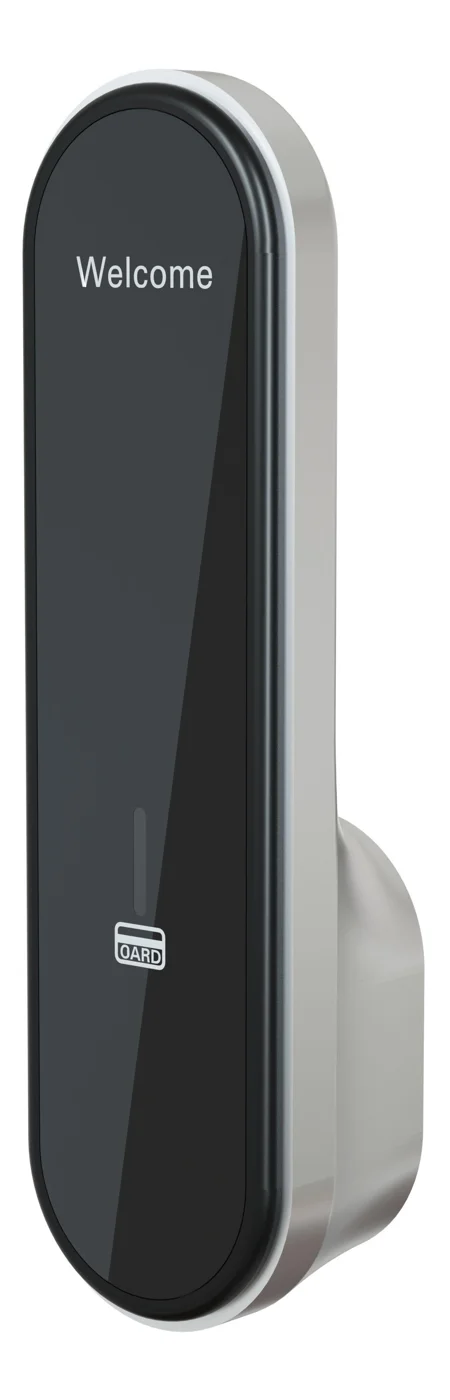
RFID Cabinet Lock — MIFARE Card, Offline Authentication
Offline MIFARE RFID cabinet lock for gym, spa, and office lockers. Tap-to-unlock 13.56 MHz, no WiFi needed, 5-minute retrofit. Zinc alloy body, battery-powered.
This page already points to it as the next recommended reference.
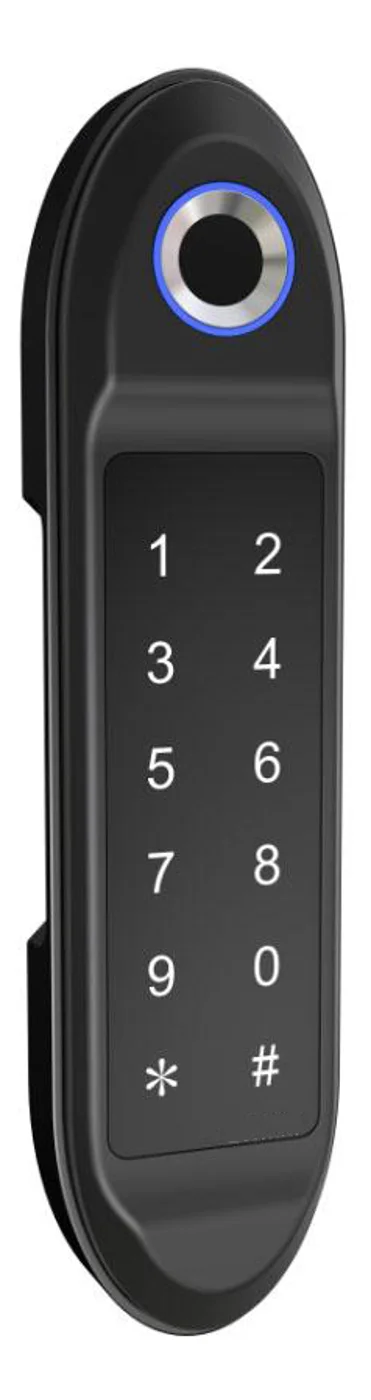
PIN Code Electronic Cabinet Lock — Stand-Alone, No WiFi
Offline keypad cabinet lock for gym, office and parcel lockers. Battery-powered, 5-minute retrofit, audit-free simple deployment. PIN + MIFARE card, DC 6V, 4×AA.
This page already points to it as the next recommended reference.
Related blog posts
3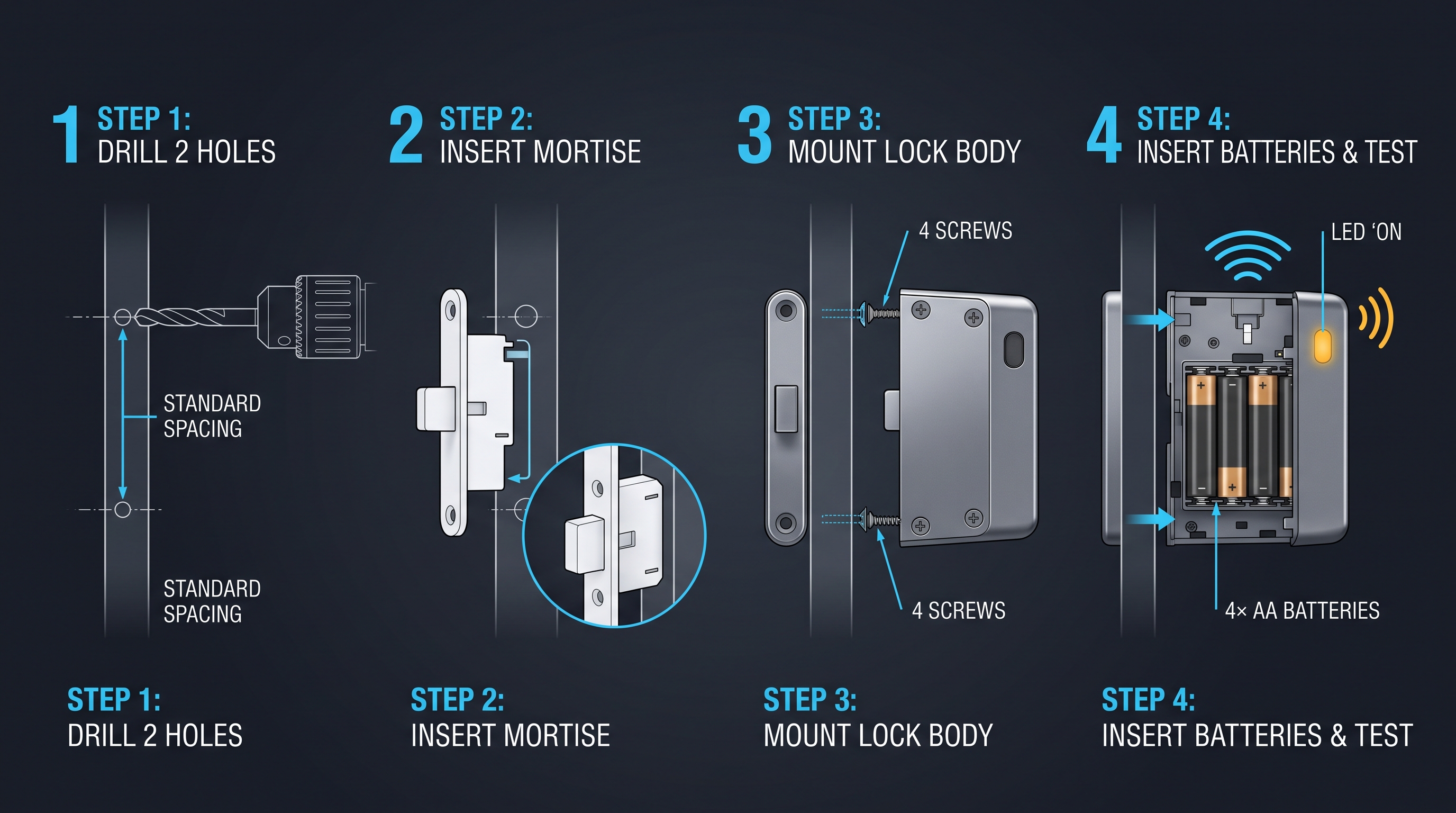
Electronic Cabinet Access: The Complete Guide to Digital Cabinet Entry
Electronic cabinet access replaces keyed locks with digital credentials, generating an access record and letting admins add or revoke users without touching hardware; this guide covers keypad, RFID, biometric, and connected electronic cabinet access methods.
It supports the same product context: Office Cabinet Lock — PIN + Card for Filing & Pedestals.
Display Cabinet Lock: The Complete Guide to Securing Glass Showcases and Retail Display Cabinets
Learn how a display cabinet lock secures glass showcases and retail displays. Compare electromagnetic, RFID, and keyed display cabinet lock types for any application.
It supports the same product context: Office Cabinet Lock — PIN + Card for Filing & Pedestals.
Electronic Access Cabinet: The Complete Guide to Smart Locking Enclosures
Explore electronic access cabinet systems with RFID, Bluetooth, PIN, and biometric control. Learn about powered enclosures for IT, healthcare, and evidence management.
It supports the same product context: Office Cabinet Lock — PIN + Card for Filing & Pedestals.
Specify your hotel project with our engineers
Send your room count, ceiling type, and protocol preference. We will return a sample plan and quote within 24 business hours.
- Move from general guidance into a product or application discussion.
- Use RFQ when pricing, drawings, MOQ, or launch timing needs structure.
- Keep a direct contact path visible for fast clarifications and handoff.